기능(Feature) #3189
open기능(Feature) #3186: [OMH/OMT] B2C Personal Data Transfer Policy
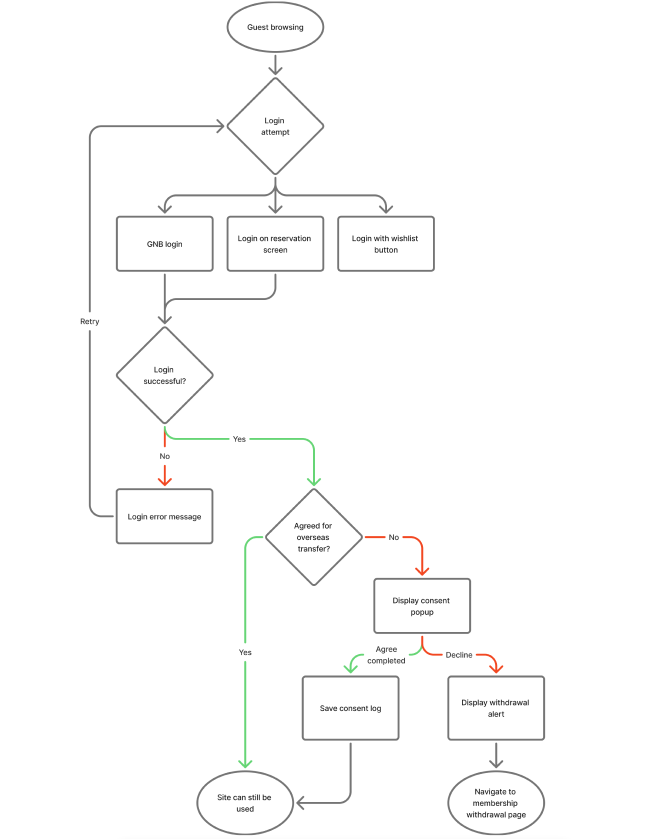
[OMH] Flow Personal-Data-Transfer-Popup
100%
Description
Plan: https://luck-polonium-5e9.notion.site/B2C-Personal-Data-Transfer-Policy-3120df1854a180b98521c180542317c8
Link design: https://www.figma.com/design/V5Gvarhu4GEgP8RSwPSa7H/B2C-Personal-Data-Transfer-Popup-%EA%B0%9C%EC%9D%B8%EC%A0%95%EB%B3%B4-%EC%9D%B4%EA%B4%80-%ED%8C%9D%EC%97%85?node-id=0-1&p=f&t=SnJNzeG1yZ1AeL1F-0
request:
- Once a user initiates/accepts the account deletion process, a pop-up will appear on every page they visit (except for the specific Account Deletion page).
Files
Updated by harry harry 6 days ago
- Status changed from 신규(New) to QA test
- Assignee changed from Joo dev to Tracy Tran
- % Done changed from 0 to 100
- Build env. set to Dev
Updated by Tracy Truong 6 days ago
- Assignee changed from Tracy Tran to Tracy Truong
Updated by Tracy Truong 6 days ago
- File During reservation log in.mp4 During reservation log in.mp4 added
- File Wish list button - log in.mp4 Wish list button - log in.mp4 added
- File GNB Log in.mp4 GNB Log in.mp4 added
- File Agree success.mp4 Agree success.mp4 added
- File Disagree - go to Delete account page.mp4 Disagree - go to Delete account page.mp4 added
- File issue 1.mp4 issue 1.mp4 added
- File issue 2.mp4 issue 2.mp4 added
- File issue 3.mp4 issue 3.mp4 added
- File Stay in delete account page & make other action.mp4 Stay in delete account page & make other action.mp4 added
- File Issue 4 Log in & agree oversea transfer success click wishlist button show alert Contact the person in charge.mp4 Issue 4 Log in & agree oversea transfer success click wishlist button show alert Contact the person in charge.mp4 added
- File picture567-1.png picture567-1.png added
- Status changed from QA test to 완료실패(Failed)
- Assignee changed from Tracy Truong to Joo dev
This task is test flow only, bug about wrong text will log on #3212
Test on PC, ok
Test on MOweb
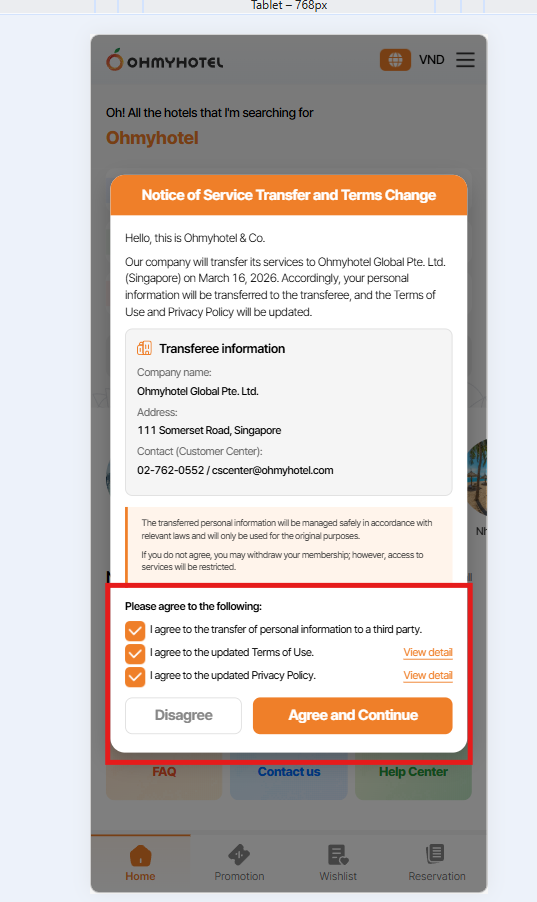
1. When click disagree > alert appear > click cancel button on alert pop up
currently: alert pop up & notice pop up is closed
expected: only alert pop up is closed, notice pop up still remain unclosed
2. Non logged in > click wishlist button > log in request alert display > click confirm > Log in modal display > log in success > alert "Contact the person incharge" display
expected: not display this alert
3. Log in during make reservation > pop up notice appear > disagree > navigate to delete account page > click Back button > Alert "invalid request. Go to main page" display
expected: not display this alert
4. Log in & agree oversea transfer success > click wishlist button > show alert "Contact the person in charge"
5. All term & condition on Notice pop up is selected as default
Expected: default is unselect
Updated by Tracy Truong 4 days ago
- File Ohmyhotel and 9 more pages - Work 2 - Microsoft Edge 2026-03-06 14-14-01.mp4 Ohmyhotel and 9 more pages - Work 2 - Microsoft Edge 2026-03-06 14-14-01.mp4 added
- File Ohmyhotel and 9 more pages - Work 2 - Microsoft Edge 2026-03-06 14-15-13.mp4 Ohmyhotel and 9 more pages - Work 2 - Microsoft Edge 2026-03-06 14-15-13.mp4 added
- File Ohmyhotel and 9 more pages - Work 2 - Microsoft Edge 2026-03-06 14-16-50.mp4 Ohmyhotel and 9 more pages - Work 2 - Microsoft Edge 2026-03-06 14-16-50.mp4 added
- File Ohmyhotel and 9 more pages - Work 2 - Microsoft Edge 2026-03-06 14-22-21.mp4 Ohmyhotel and 9 more pages - Work 2 - Microsoft Edge 2026-03-06 14-22-21.mp4 added
- File Ohmyhotel and 9 more pages - Work 2 - Microsoft Edge 2026-03-06 14-25-20.mp4 Ohmyhotel and 9 more pages - Work 2 - Microsoft Edge 2026-03-06 14-25-20.mp4 added
- File picture007-1.png picture007-1.png added
- Status changed from QA test to 완료실패(Failed)
- Assignee changed from Tracy Truong to John Lee
Test on MOweb
1. When click disagree > alert appear > click cancel button on alert pop up
currently: alert pop up & notice pop up is closed
expected: only alert pop up is closed, notice pop up still remain unclosed
=> fixed
2. Non logged in > click wishlist button > log in request alert display > click confirm > Log in modal display > log in success > alert "Contact the person incharge" display
expected: not display this alert
=> fixed
3. Log in during make reservation > pop up notice appear > disagree > navigate to delete account page > click Back button > Alert "invalid request. Go to main page" display
expected: not display this alert
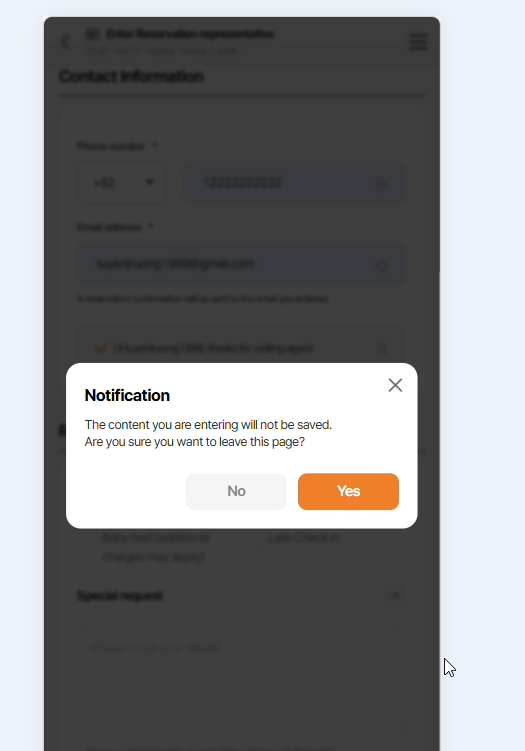
=> failed, log in success > only show alert "The content you are entering is not save ..." > click Yes on pop up > navigate to main screen
4. Log in & agree oversea transfer success > click wishlist button > show alert "Contact the person in charge"
=> Fixed
5. All term & condition on Notice pop up is selected as default
Expected: default is unselect
=> fixed
Updated by John Lee 4 days ago
- Status changed from 완료실패(Failed) to QA test
- Assignee changed from John Lee to Tracy Truong
3. Log in during make reservation > pop up notice appear > disagree > navigate to delete account page > click Back button > Alert "invalid request. Go to main page" display
expected: not display this alert
=> failed, log in success > only show alert "The content you are entering is not save ..." > click Yes on pop up > navigate to main screen
Fixed
Updated by Tracy Truong 4 days ago
- File Ohmyhotel and 6 more pages - Work 2 - Microsoft Edge 2026-03-06 15-21-32.mp4 Ohmyhotel and 6 more pages - Work 2 - Microsoft Edge 2026-03-06 15-21-32.mp4 added
- Status changed from QA test to 완료(Done)
- Assignee changed from Tracy Truong to John Lee
Issue 3: retested, fixed
Updated by harry harry 4 days ago
- Status changed from 완료(Done) to QA test
- Assignee changed from John Lee to Tracy Truong
- Build env. changed from Dev to Staging
Updated by ziniy Kang 1 day ago
- Due date set to 03/06/2026
- Start date set to 03/06/2026
Updated by Tracy Truong 1 day ago
- File Ohmyhotel and 3 more pages - Work 2 - Microsoft Edge 2026-03-09 09-37-28.mp4 Ohmyhotel and 3 more pages - Work 2 - Microsoft Edge 2026-03-09 09-37-28.mp4 added
- File Ohmyhotel and 3 more pages - Work 2 - Microsoft Edge 2026-03-09 09-40-01.mp4 Ohmyhotel and 3 more pages - Work 2 - Microsoft Edge 2026-03-09 09-40-01.mp4 added
- File Ohmyhotel and 3 more pages - Work 2 - Microsoft Edge 2026-03-09 09-41-31.mp4 Ohmyhotel and 3 more pages - Work 2 - Microsoft Edge 2026-03-09 09-41-31.mp4 added
- File Ohmyhotel and 3 more pages - Work 2 - Microsoft Edge 2026-03-09 09-44-23.mp4 Ohmyhotel and 3 more pages - Work 2 - Microsoft Edge 2026-03-09 09-44-23.mp4 added
- File Ohmyhotel and 3 more pages - Work 2 - Microsoft Edge 2026-03-09 09-48-05.mp4 Ohmyhotel and 3 more pages - Work 2 - Microsoft Edge 2026-03-09 09-48-05.mp4 added
- File Ohmyhotel and 6 more pages - Work 2 - Microsoft Edge 2026-03-09 10-03-39.mp4 Ohmyhotel and 6 more pages - Work 2 - Microsoft Edge 2026-03-09 10-03-39.mp4 added
- File Ohmyhotel and 4 more pages - Work 2 - Microsoft Edge 2026-03-09 10-12-43.mp4 Ohmyhotel and 4 more pages - Work 2 - Microsoft Edge 2026-03-09 10-12-43.mp4 added
- File Ohmyhotel and 4 more pages - Work 2 - Microsoft Edge 2026-03-09 10-17-06.mp4 Ohmyhotel and 4 more pages - Work 2 - Microsoft Edge 2026-03-09 10-17-06.mp4 added
- File Ohmyhotel and 4 more pages - Work 2 - Microsoft Edge 2026-03-09 10-19-11.mp4 Ohmyhotel and 4 more pages - Work 2 - Microsoft Edge 2026-03-09 10-19-11.mp4 added
- File Ohmyhotel and 4 more pages - Work 2 - Microsoft Edge 2026-03-09 10-24-23.mp4 Ohmyhotel and 4 more pages - Work 2 - Microsoft Edge 2026-03-09 10-24-23.mp4 added
- Status changed from QA test to 완료실패(Failed)
- Assignee changed from Tracy Truong to John Lee
MO:
1. Log in during make reservation > pop up notice appear > disagree > navigate to delete account page > click Back button > Alert "invalid request. Go to main page" display
expected: not display this alert
2. Log in & agree oversea transfer success > click wishlist button > show alert "Contact the person in charge"
Updated by Tracy Truong about 21 hours ago
Tracy Truong wrote in #note-12:
MO:
1. Log in during make reservation > pop up notice appear > disagree > navigate to delete account page > click Back button > Alert "invalid request. Go to main page" display
expected: not display this alert
2. Log in & agree oversea transfer success > click wishlist button > show alert "Contact the person in charge"
Case 1: As feedback from Harry, this case is system rule so no need to fix. Please ignore it
Updated by Joo dev about 19 hours ago
- Status changed from 완료실패(Failed) to QA test
- Assignee changed from John Lee to Tracy Truong
Updated by Tracy Truong about 19 hours ago
- File Ohmyhotel and 6 more pages - Work 2 - Microsoft Edge 2026-03-09 15-41-47.mp4 Ohmyhotel and 6 more pages - Work 2 - Microsoft Edge 2026-03-09 15-41-47.mp4 added
- File Ohmyhotel and 6 more pages - Work 2 - Microsoft Edge 2026-03-09 15-45-41.mp4 Ohmyhotel and 6 more pages - Work 2 - Microsoft Edge 2026-03-09 15-45-41.mp4 added
- File 오마이트립 – 오 내가 찾는 모든 여행 and 7 more pages - Work 2 - Microsoft Edge 2026-03-09 15-48-05.mp4 오마이트립 – 오 내가 찾는 모든 여행 and 7 more pages - Work 2 - Microsoft Edge 2026-03-09 15-48-05.mp4 added
- Status changed from QA test to 완료(Done)
- Assignee changed from Tracy Truong to John Lee
Case 2: Root Cause:
This issue occurred due to duplicate data when a user added a hotel to the wishlist while logged in, then logged out, clicked the “Add” button for the same hotel, and logged in again.
Resolution:
The IT team has fixed the issue. The “Add to Wishlist” alert popup now appears correctly even if the hotel had already been added previously.
=> Tested on STG (OMH, OMH MO, OMT), ok
Note: on Prod, OMT MO currently is not show “Add to Wishlist” alert also.
Dear ziniy Kang, please discuss with Plan team about creating other task for this case if needed
Updated by ziniy Kang about 18 hours ago
- Status changed from 완료(Done) to 피드백(Feedback)
- Assignee changed from John Lee to Lexi Kim
Updated by Lexi Kim about 3 hours ago
- Assignee changed from Lexi Kim to John Lee
Please find my responses to your questions and an additional requests below.
1. OMT MO (PROD): There is no need to display the alert message, "You can use the Wishlist after log in. Would you like to log in now?" Therefore, creating an additional ticket is unnecessary, and we will no longer proceed with ticket #3196. Tracy Truong
2. Additional Request: From a UX perspective, it is not ideal for the "Saved to Wishlist" popup to appear above the "Personal Data Transfer Popup." The "Personal Data Transfer Popup" must be positioned on the highest layer, above all other elements, including alerts. I have updated the storyboard to reflect this change. Could you please check if this can be reflected on the STG environment by 12:00 PM (Vietnam time) today? John Lee
Updated by John Lee about 2 hours ago
- Assignee changed from John Lee to Joo dev