개선(improvement) #2520
closedAdd “Bulk Update” Feature to Rate Plans
Added by ziniy Kang 3 months ago. Updated 3 months ago.
100%
Description
Files
| picture844-1.png (127 KB) picture844-1.png | ziniy Kang, 12/03/2025 06:58 AM | ||
| 2520-1.PNG (116 KB) 2520-1.PNG | Tracy Tran, 12/04/2025 08:41 AM | ||
| RP Bulkupdate button.PNG (156 KB) RP Bulkupdate button.PNG | Tracy Tran, 12/05/2025 04:14 AM | ||
| Ratepla BulkUpdate alert.png (195 KB) Ratepla BulkUpdate alert.png | Tracy Tran, 12/05/2025 04:18 AM | ||
| picture158-1.png (48.6 KB) picture158-1.png | ziniy Kang, 12/08/2025 01:00 AM | ||
| Screenshot 2025-12-08 133740.png (167 KB) Screenshot 2025-12-08 133740.png | Tracy Tran, 12/08/2025 06:40 AM | ||
| 2520 - A.PNG (195 KB) 2520 - A.PNG | Tracy Tran, 12/08/2025 06:41 AM |
Related issues
Updated by ziniy Kang 3 months ago
- File picture309-1.png added
- Description updated (diff)
Updated by ziniy Kang 3 months ago
- File picture844-1.png picture844-1.png added
- Description updated (diff)
Updated by ziniy Kang 3 months ago
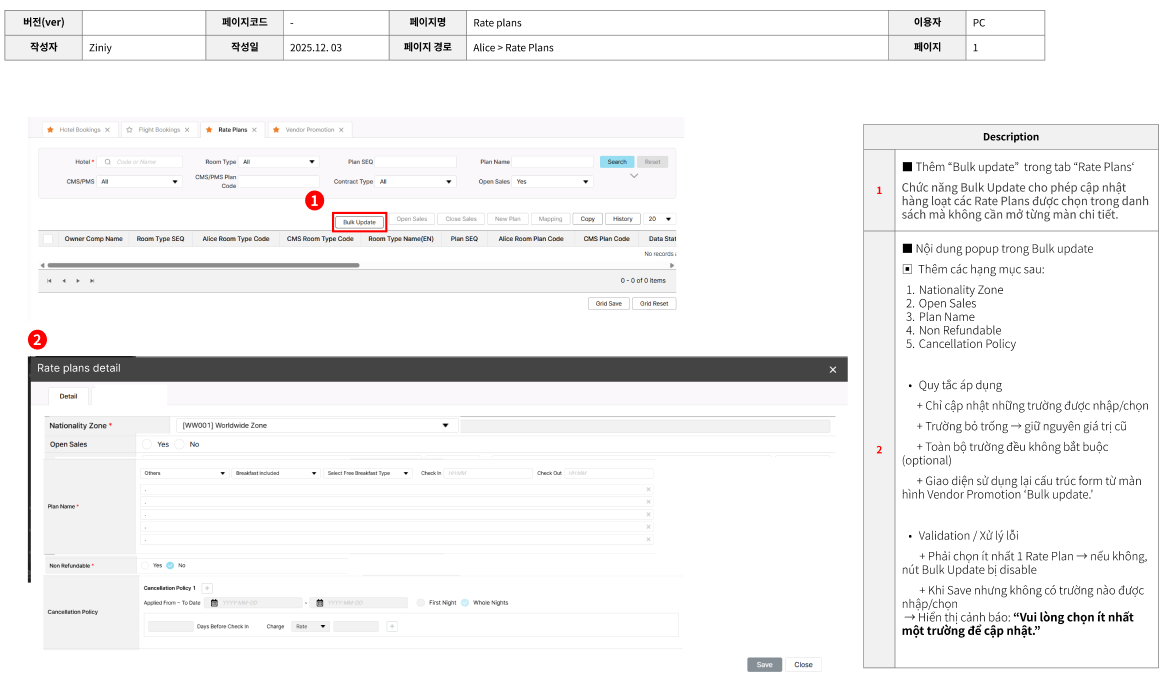
■ Thêm “Bulk update”  trong tab “Rate Plans‘
Chức năng Bulk Update cho phép cập nhật hàng loạt các Rate Plans được chọn trong danh sách mà không cần mở từng màn chi tiết.

■ Nội dung popup trong Bulk update
▣  Thêm các hạng mục sau:
Nationality Zone
Open Sales
Plan Name
Non Refundable
Cancellation Policy

Quy tắc áp dụng
      + Chỉ cập nhật những trường được nhập/chọn
      + Trường bỏ trống → giữ nguyên giá trị cũ
      + Toàn bộ trường đều không bắt buộc (optional)
      + Giao diện sử dụng lại cấu trúc form từ màn hình Vendor Promotion ‘Bulk update.’

Validation / Xử lý lỗi
       + Phải chọn ít nhất 1 Rate Plan → nếu không, nút Bulk Update bị disable
       + Khi Save nhưng không có trường nào được nhập/chọn
 → Hiển thị cảnh báo: “Vui lòng chọn ít nhất một trường để cập nhật.”(đa ngôn ngữ)
Updated by calvin dev 3 months ago
curl --location --request PUT 'http://localhost:8080/admin/vendor/plan/bulk' \
--header 'Content-Type: application/json' \
--header 'userToken: Bearer YOUR_TOKEN_HERE' \
--data '{
"language": "EN",
"country": "KR",
"stationTypeCode": "STN03",
"currency": "KRW",
"condition": {
"vendorRoomPlanSeqs": [305867, 305868],
"salesStopYn": false,
"nonRefundableYn": true,
"roomPlanNameEn": "Bulk Updated Plan Name",
"nationalityZones": [
{
"nationalityZoneCode": "WW001"
}
],
"cancellationPolicies": [
{
"appliedFromDate": "2025-01-01",
"appliedToDate": "2025-12-31",
"cancelPolicyDate": 1,
"firstCancelDeadlineTime": "18:00",
"cancelPenaltyRateOrAmount": "R",
"cancelPenaltyValue": 100,
"cancelPenaltyBasisCode": "A"
}
]
}
}'
Updated by calvin dev 3 months ago
- Status changed from 진행(Doing) to 완료(Done)
- Build env. set to Dev
Updated by calvin dev 3 months ago
- Status changed from 완료(Done) to QA test
- Assignee changed from calvin dev to Tracy Tran
Updated by Tracy Tran 3 months ago
- File 2520-1.PNG 2520-1.PNG added
- Status changed from QA test to 피드백(Feedback)
- Assignee changed from Tracy Tran to calvin dev
Checked on Dev
Bulk Update 2-3 rateplan at the same time.
1. Able to apply National Code for old rateplans which does not have data in this field before.
2. Able to change rateplan name
3. Able to change status
4. Rateplan name (2nd and 3rd field) get wrong data.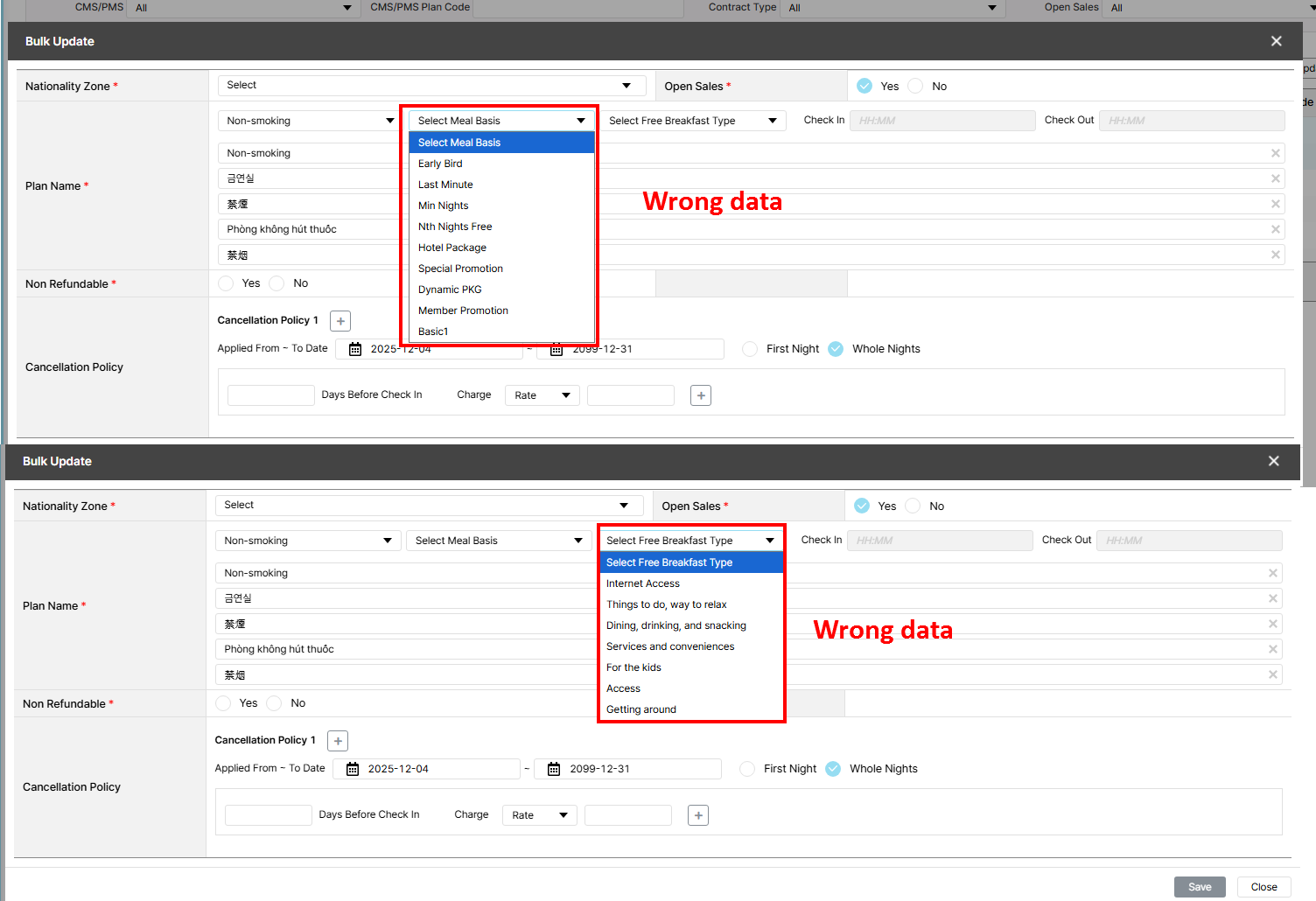
5. Cancellation policy could not change. IT team informed code conflict, need to move to staging for testing.
Dear ziniy Kang, please check
Updated by ziniy Kang 3 months ago
- Status changed from 피드백(Feedback) to 완료실패(Failed)
Updated by ziniy Kang 3 months ago
- Status changed from 완료실패(Failed) to QA test
- Assignee changed from calvin dev to Tracy Tran
Updated by Tracy Tran 3 months ago
- File RP Bulkupdate button.PNG RP Bulkupdate button.PNG added
- File Ratepla BulkUpdate alert.png Ratepla BulkUpdate alert.png added
- Status changed from QA test to 완료(Done)
- Assignee changed from Tracy Tran to Tan Jang
Case 4: get correct data ==> OK
Please check the clip as below link for your reference.
https://ohmylab-my.sharepoint.com/:v:/g/personal/tram_tt_ohmyhotel_com/EdPsICvKS4hOp-jMfuXluewBrbWKvIzGiJ8WsttkmUNkLQ?e=wQoiyR
ziniy Kang but select free breakfast for the 1st field does not auto fill for 2nd and 3rd field as rateplan function currently. This is not mentioned in requirement. Please check again.
Case 5: As mentioned in previous comt, need to test on Staging. Currently, bulk update which included changing cancellation policy on Dev will be error as code conflict. Cannot test this case on Dev.
Case 6: ziniy Kang need your verify and confirm if it can be keep or just remove as requirment did not mention.
A. Bulk Update button > different position with your requirement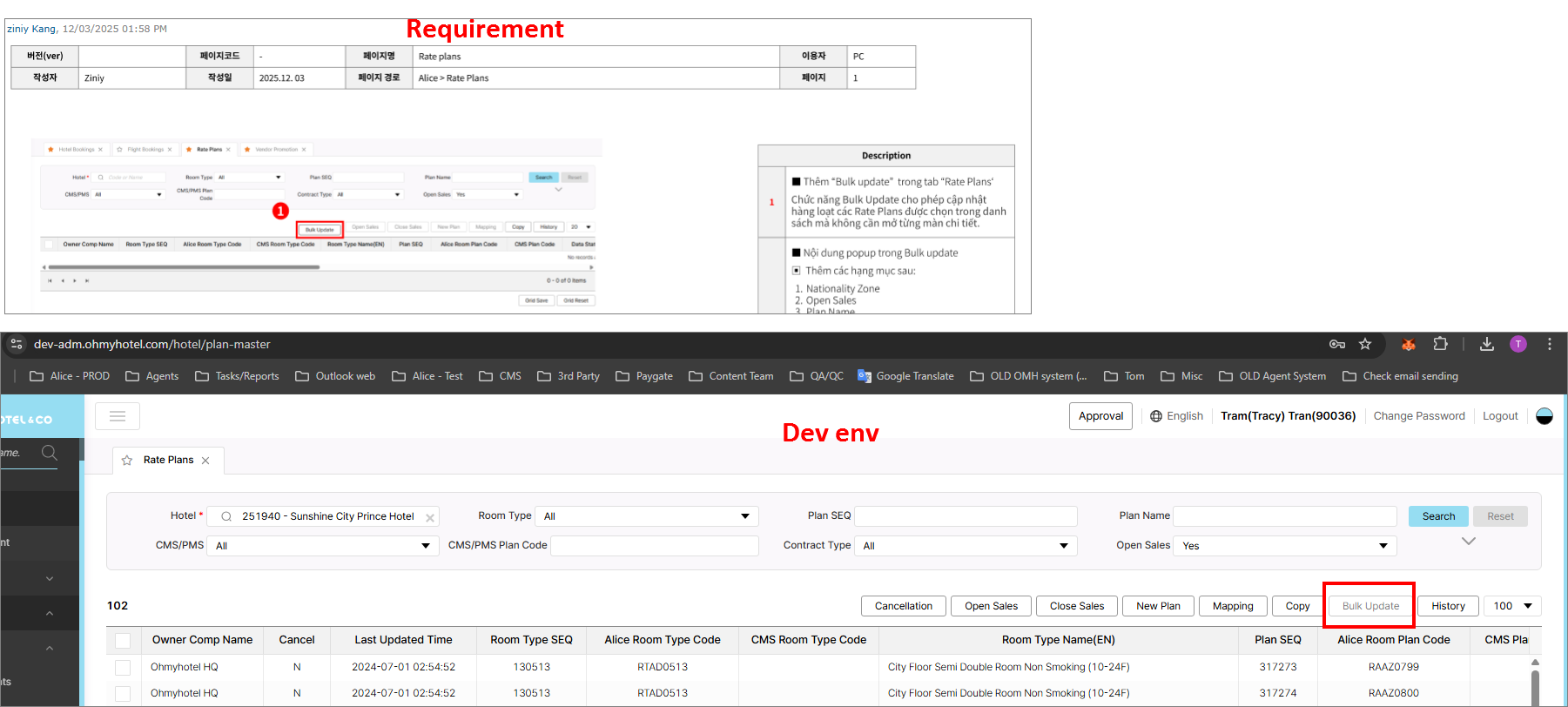
B. Validation: Alert when no field has been chosen > Alert OK, but there is orange frame and ! signal display. This one does not mention in requirement.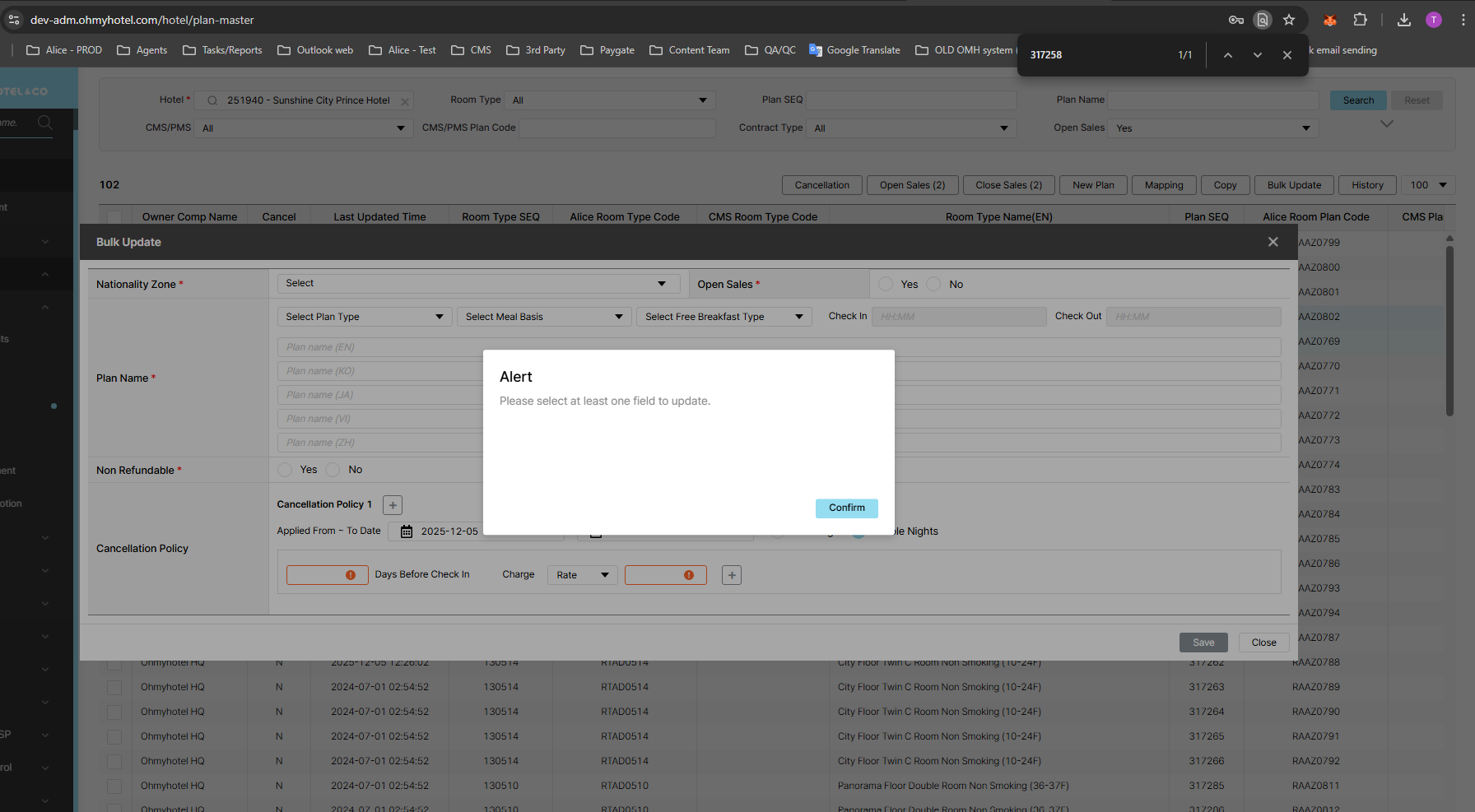
Updated by ziniy Kang 3 months ago
- File picture158-1.png picture158-1.png added
4. Khi chọn “Free Breakfast” ở field 1, thì field 2 và field 3 tự động fill giống như behavior của Rateplan hiện tại.
5. Đã xác nhận.
6. Validation: Bỏ "*"
+ Hiện viền cam + dấu chấm than, > giữ nguyên.
+ Vị trí nút Bulk Update > đặt sau "cancellation" 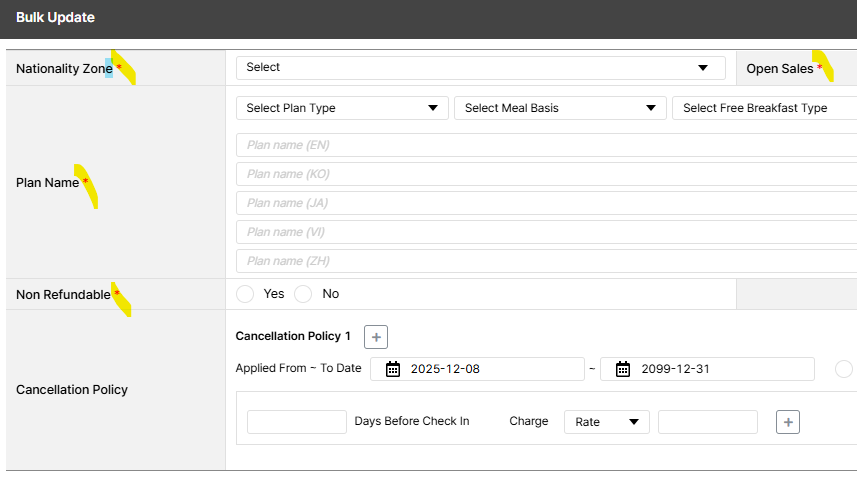
Updated by calvin dev 3 months ago
- Assignee changed from Tan Jang to calvin dev
Updated by calvin dev 3 months ago
- Status changed from 완료(Done) to QA test
- Assignee changed from calvin dev to Tracy Tran
Updated by Tracy Tran 3 months ago
- File Screenshot 2025-12-08 133740.png Screenshot 2025-12-08 133740.png added
- File 2520 - A.PNG 2520 - A.PNG added
Tested on Staging
1. Add Bulk Update button in rateplan Function > OK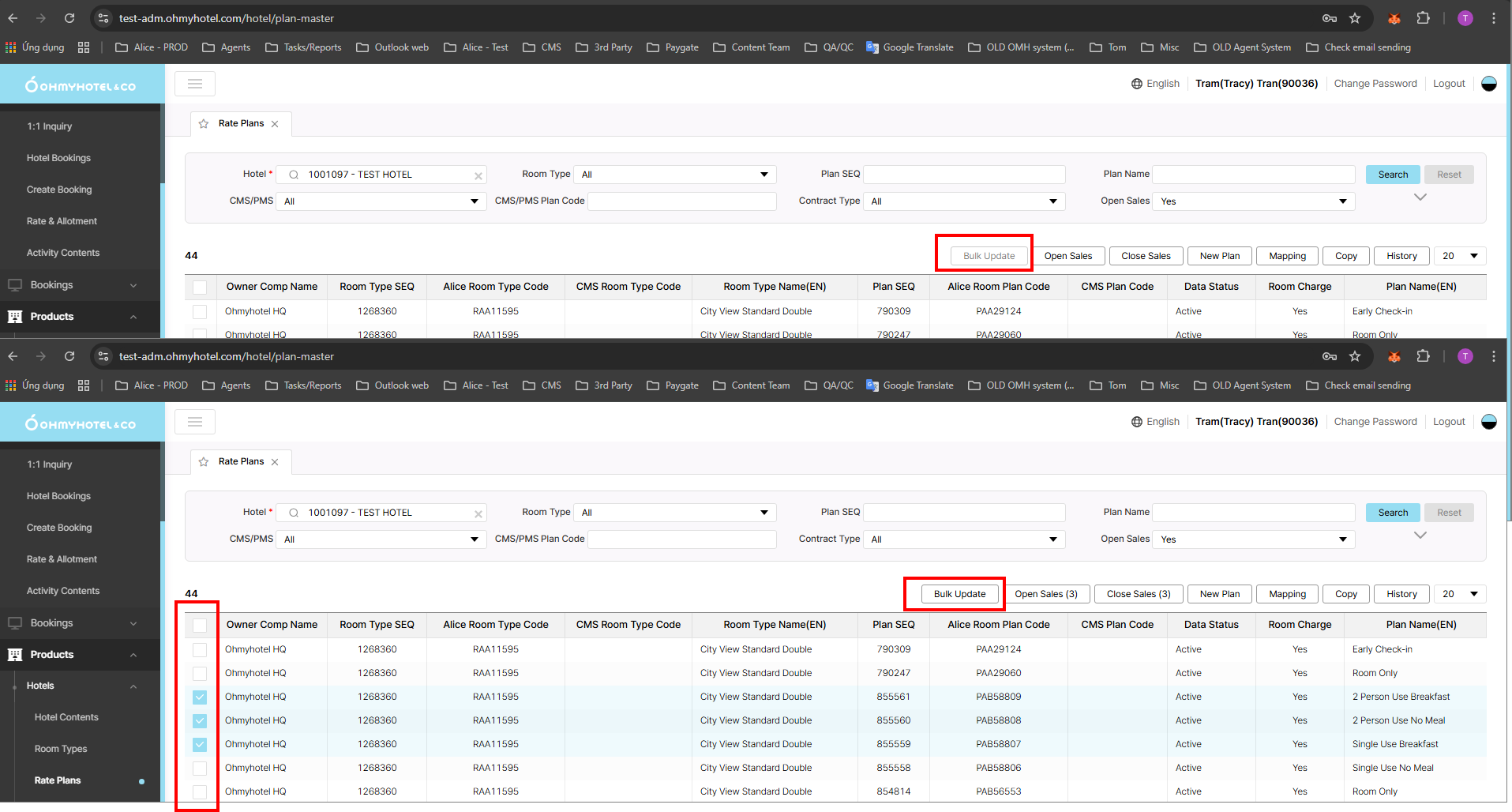
2. Bulk Update button located after after Cancellation button > There is no Cancellation Button in Staging, but currently Bulk Update button is infront of Open Sales button which correct with Requirement.
3. Belonging fields of Bulk Update:
Nationality Zone
*Open Sales
*Plan Name
*Non Refundable
*Cancellation Policy
> Display ok
*Rule:
Only changing fields will be updated > OK
Keep original for blank fields > OK
All field are optional, remove "" > OK
Reuse UI from bulk update of promotion > OK
Autofill when select free breakfast and room only (same behavior od current create new rateplan) > OK
Cancellation follow new update > OK
"!" and orange frame are kept > OK
https://ohmylab-my.sharepoint.com/:v:/g/personal/tram_tt_ohmyhotel_com/EfksUeicMKJLn5uPW4Nd4sABHyxcoFL4VDVhgQJKWubdqw?e=xMTHkn
https://ohmylab-my.sharepoint.com/:v:/g/personal/tram_tt_ohmyhotel_com/EXjc6LLZ0M5CqWK-UWi1kC4Bn3ECrEklWESwBRUGqCCUBw?e=iKvLR8
Validation:
Select at least 1 rateplan to enable Bulk update button > OK
Alert when no select/input fields when save > OK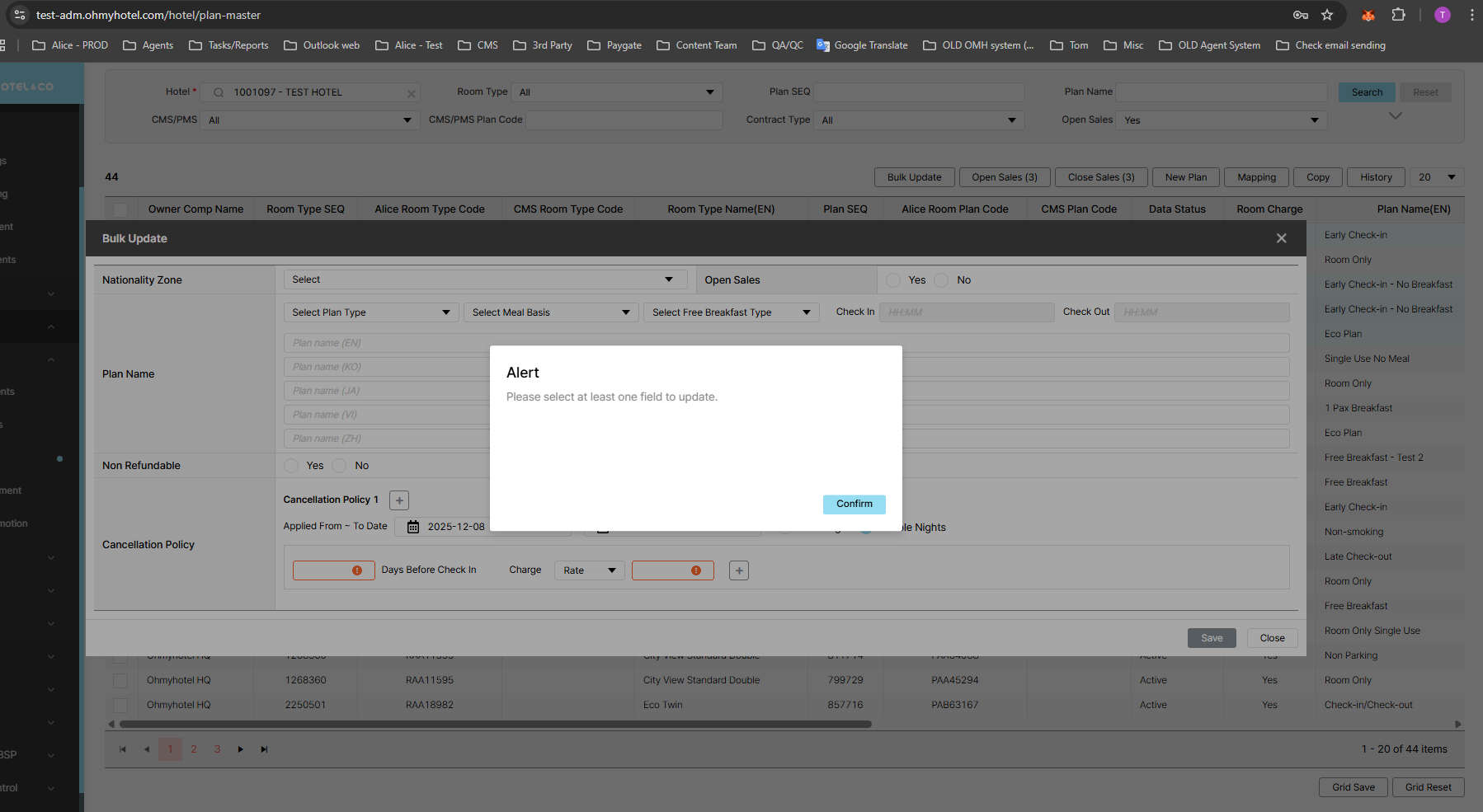
Updated by Tracy Tran 3 months ago
- Status changed from QA test to 완료(Done)
- Assignee changed from Tracy Tran to Tan Jang
Updated by calvin dev 3 months ago
- Assignee changed from Tan Jang to calvin dev
Updated by ziniy Kang 3 months ago
- Status changed from 완료(Done) to QA test
- Assignee changed from calvin dev to Tracy Tran
- Build env. changed from Staging to Prod
Updated by Tracy Tran 3 months ago
- Status changed from QA test to 완료성공(Resolve)
- Assignee changed from Tracy Tran to calvin dev
Tested on PROD
1. Add Bulk Update button in rateplan Function > OK
2. Bulk Update button located after after Cancellation button > There is no Cancellation Button in PROD, but currently Bulk Update button is infront of Open Sales button which correct with Requirement.
3. Belonging fields of Bulk Update:
Nationality Zone
*Open Sales
*Plan Name
*Non Refundable
*Cancellation Policy
Display ok
*Rule:
Only changing fields will be updated > OK
Keep original for blank fields > OK
All field are optional, remove "" > OK
Reuse UI from bulk update of promotion > OK
Autofill when select free breakfast and room only (same behavior od current create new rateplan) > OK
Cancellation follow new update > OK
"!" and orange frame are kept > OK
Validation:
Select at least 1 rateplan to enable Bulk update button > OK
Alert when no select/input fields when save > OK
https://ohmylab-my.sharepoint.com/:v:/g/personal/tram_tt_ohmyhotel_com/IQAM3VspikdcSpQIQzfEpM2JAVgG1TYGNIqEZhmT-NuRfZ4?e=yKKSL0
Updated by ziniy Kang 2 months ago
- Related to 결함(Bug) #2808: Bulk Update Rateplan - Cancellation Policy added

