결함(Bug) #1330
closed결함(Bug) #1329: Login issue
[PC] UI/UX Updates for Guest Selection and Email Sign-Up Flow
Description
Plan: https://www.figma.com/design/vOGs1fRewULwCFidZcWR69/Login---Sign-up-process?node-id=0-1&p=f&t=1eTlKr84VrKnFnbx-0
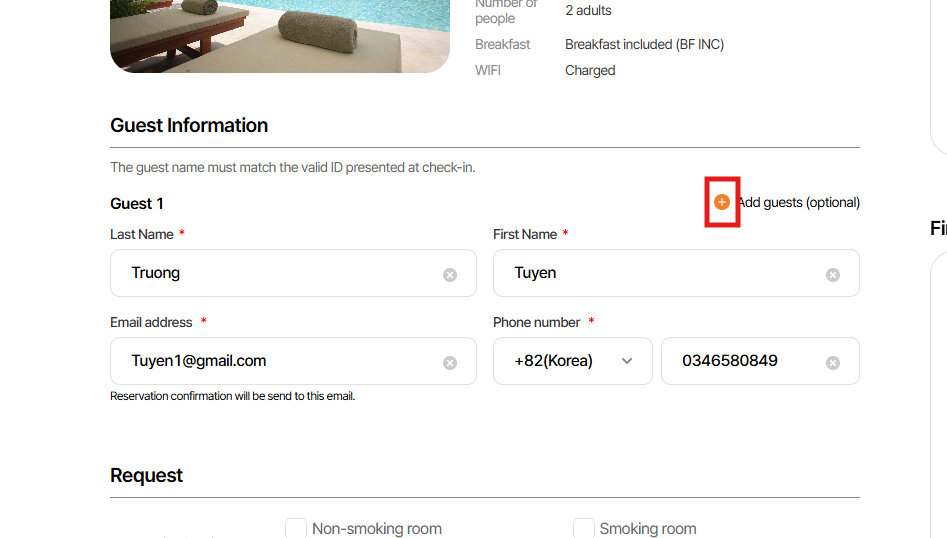
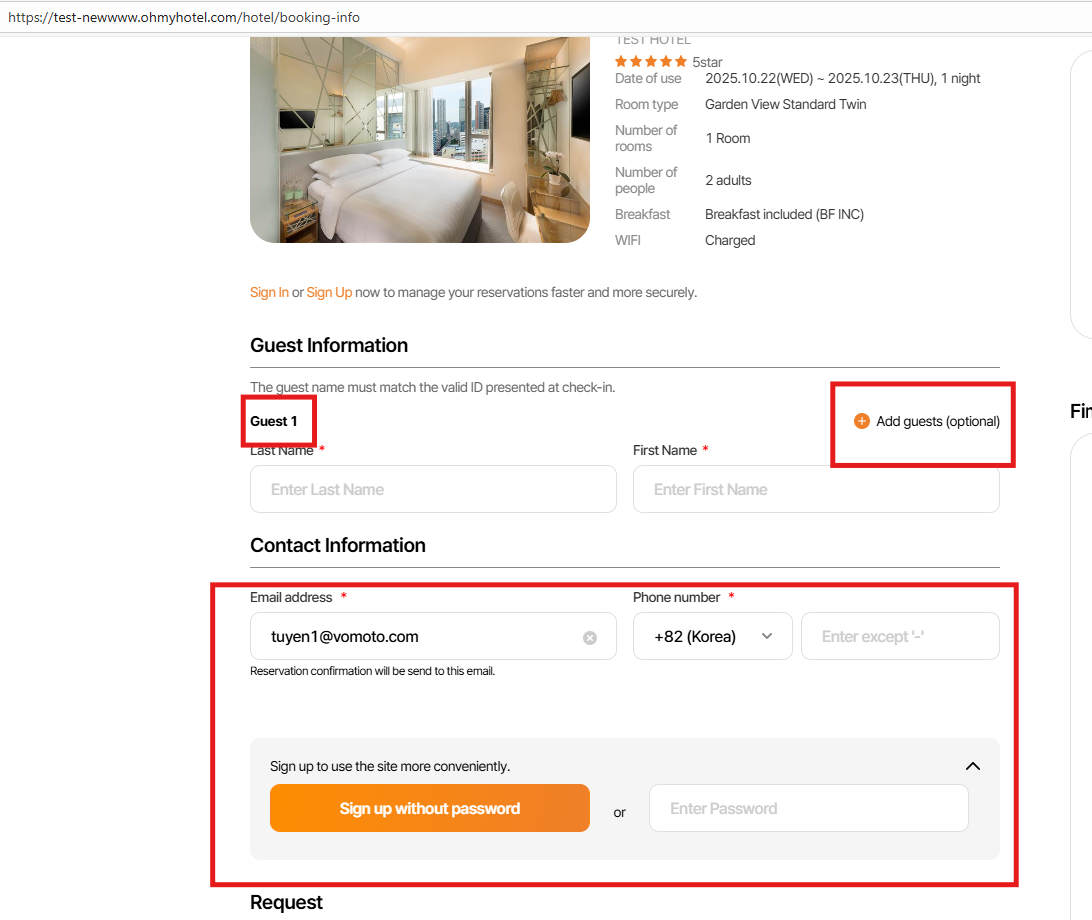
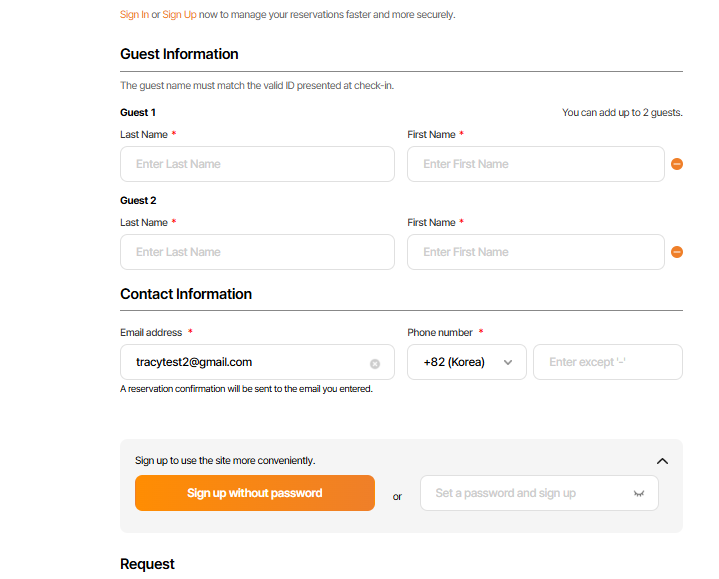
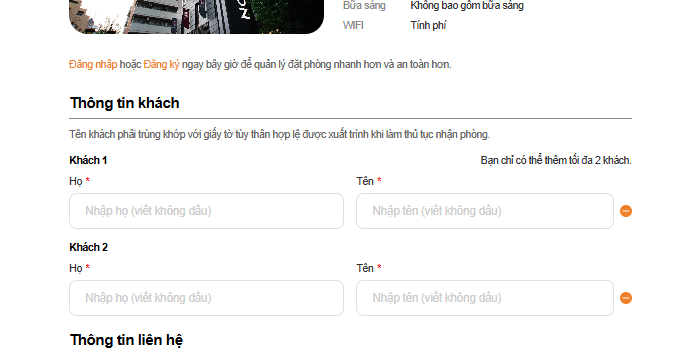
1. Khi chưa chọn ‘ Add guest’ sẽ ko hiển thị text
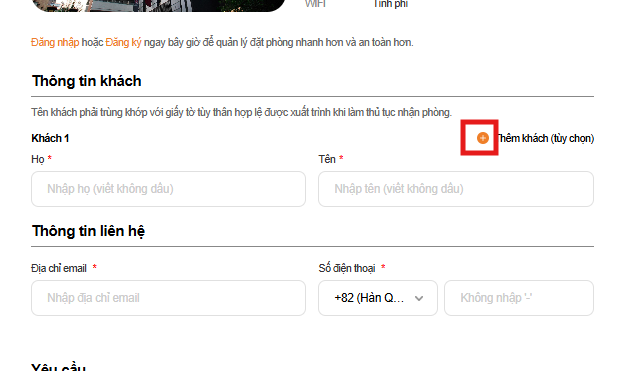
2. Chỉnh lại Btn (+)→ màu cam
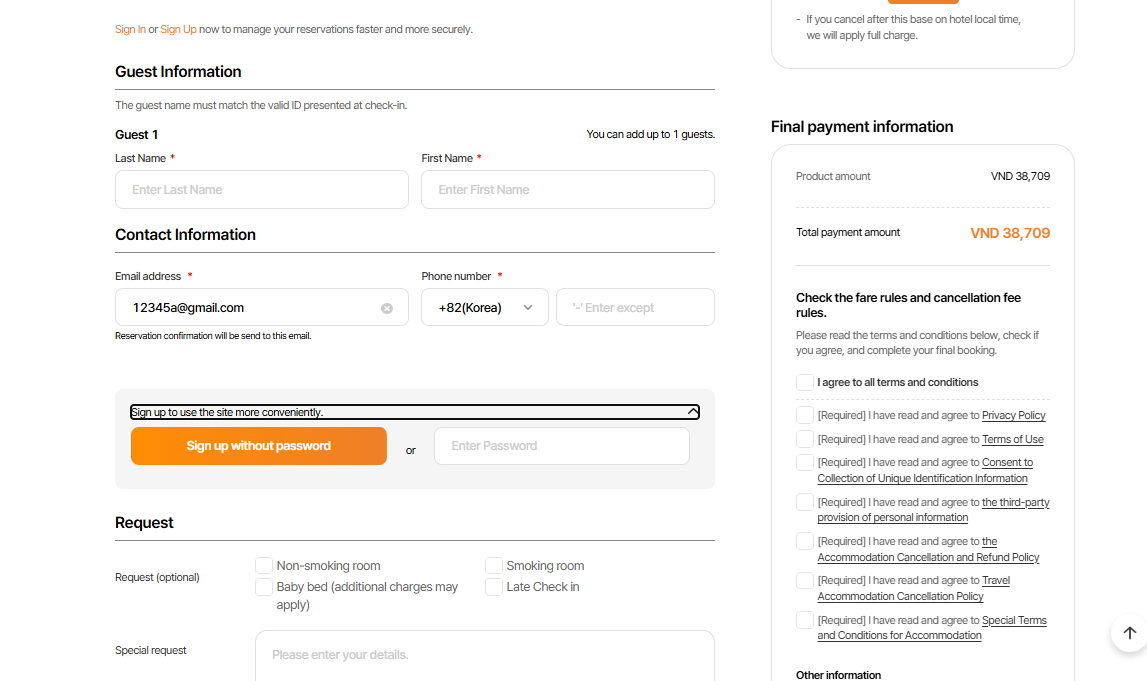
3. Sau khi nhập email mà địa chỉ chưa tồn tại
→ Pop up hướng dẫn sign up sẽ cho hiển thị mặc định là mở như ảnh dưới)
---
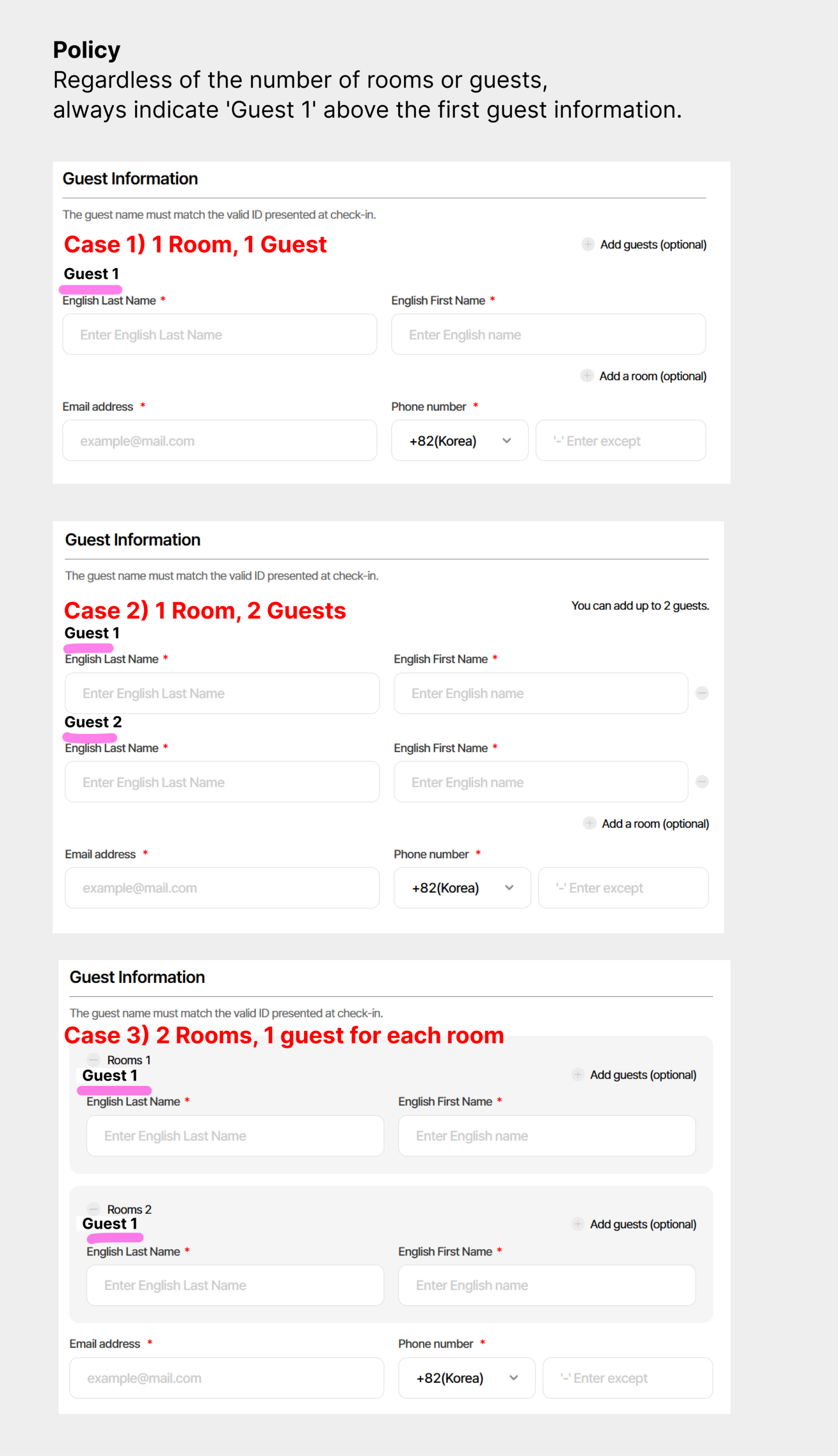
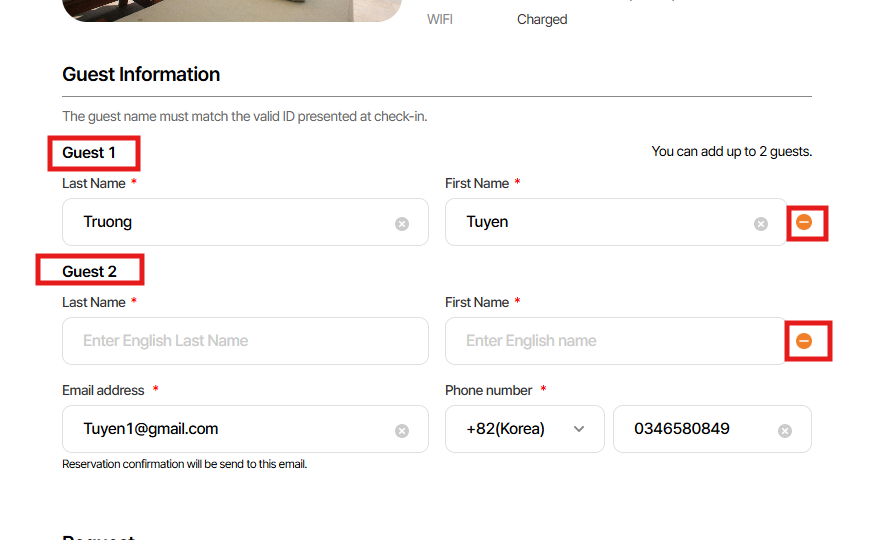
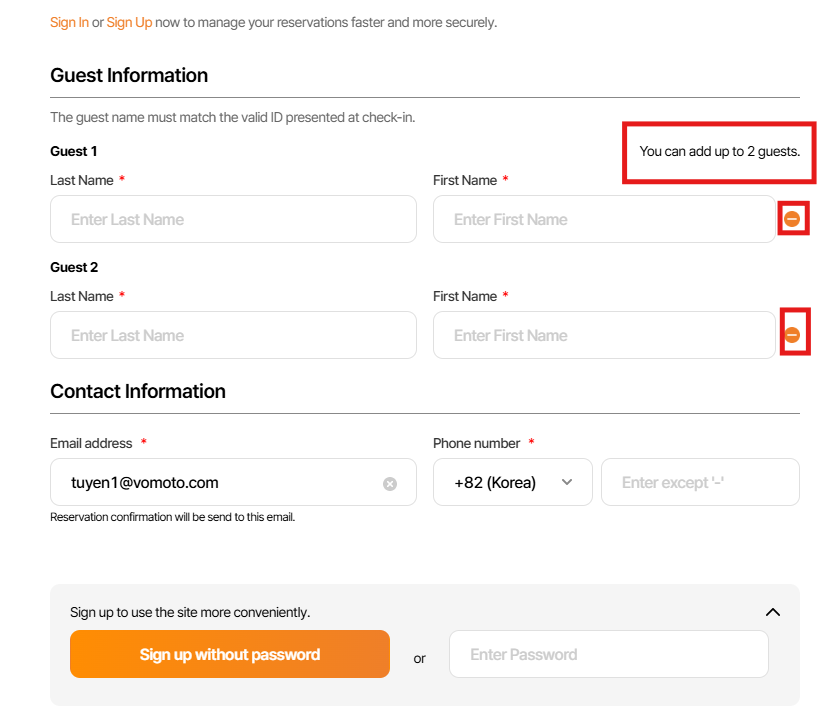
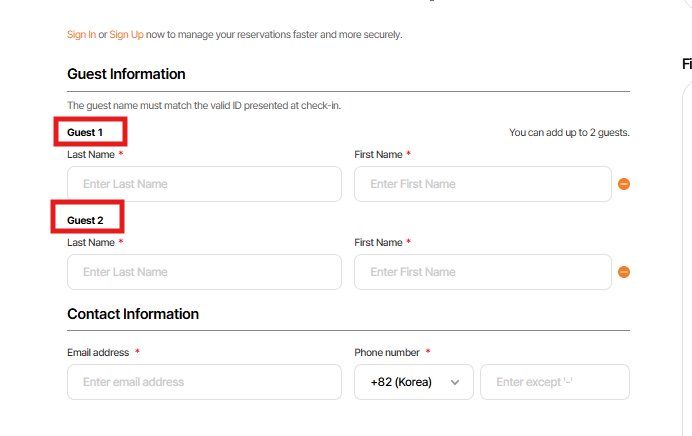
1. Khi đã chọn ‘Add guests’→ hiển thị text là ‘Guest 1’, ‘Guest 2’ NOT ‘Adult 1, Adult 2’
2. Chỉnh lại Btn (-)→ màu cam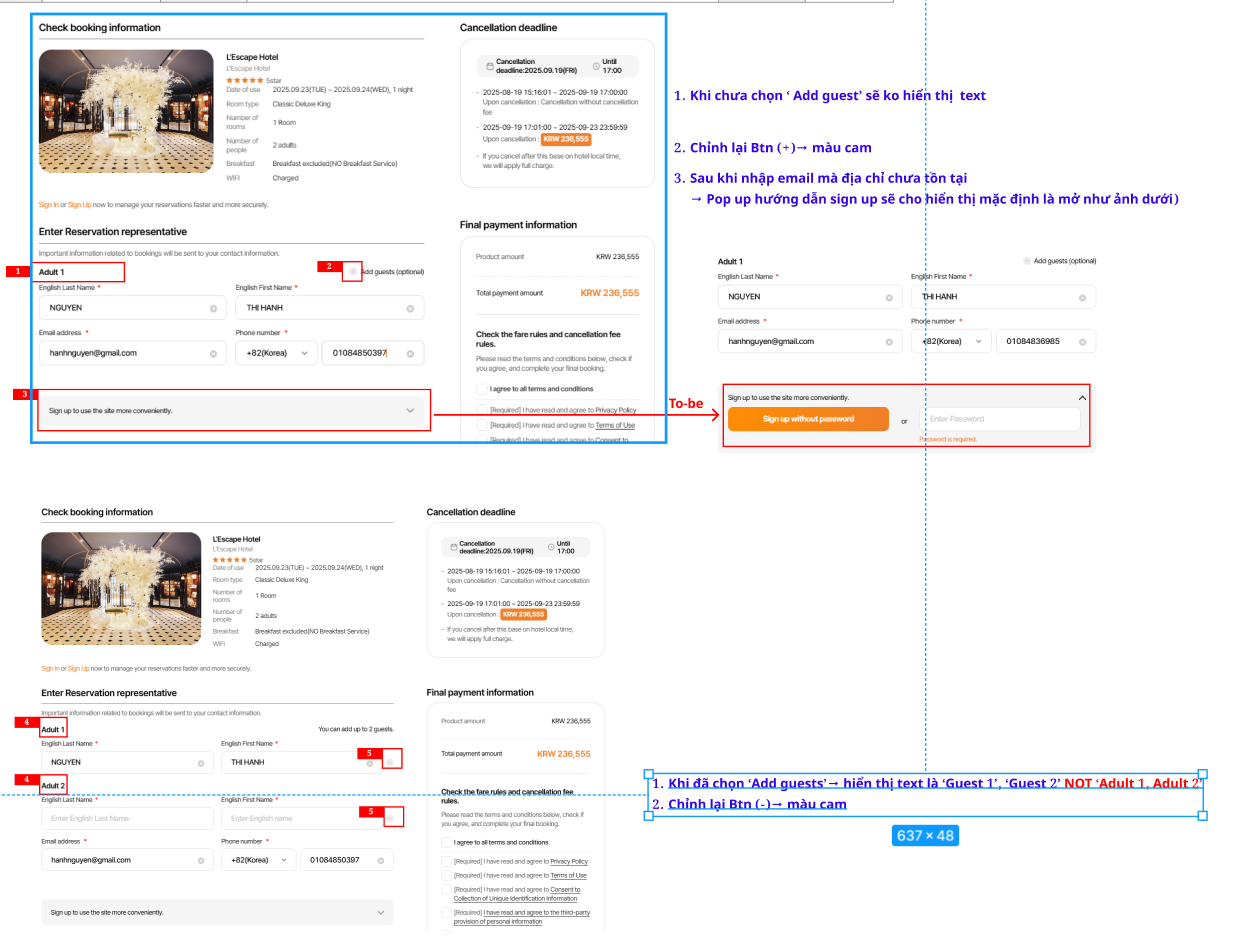
Files
| picture377-1.png (358 KB) picture377-1.png | |||
| image.png (837 KB) image.png | |||
| picture336-1.png (129 KB) picture336-1.png | |||
| picture336-2.png (79.1 KB) picture336-2.png | |||
| picture250-1.png (156 KB) picture250-1.png | |||
| picture569-1.png (263 KB) picture569-1.png | |||
| picture569-2.png (94.2 KB) picture569-2.png | |||
| picture259-1.png (41.3 KB) picture259-1.png | |||
| picture259-2.png (45.3 KB) picture259-2.png | |||
| picture259-3.png (73.6 KB) picture259-3.png | |||
| picture259-4.png (56.4 KB) picture259-4.png |
Updated by ziniy Kang 6 months ago
- Subject changed from UI/UX Updates for Guest Selection and Email Sign-Up Flow to [PC] UI/UX Updates for Guest Selection and Email Sign-Up Flow
Updated by Mon Nguyen 6 months ago
- Due date set to 09/15/2025
- Status changed from 신규(New) to 진행(Doing)
- Assignee changed from Mon Nguyen to Zia Han
- Start date set to 09/15/2025
- Estimated time set to 4.00 h
Dear Zia Han
Please help me answer some question:
1. Does we hide both case multiple room with just one Travelers every Rooms ?
Thank you so much
Updated by Mon Nguyen 6 months ago
Lexi Kim wrote in #note-5:
Please ignore request (1).
Regardless of the number of rooms or guests, always indicate 'Guest 1' above the first guest information.
Thank you
Updated by Mon Nguyen 6 months ago
- Status changed from 진행(Doing) to 완료(Done)
- % Done changed from 0 to 100
Finish update, start PR apply env
Updated by Mon Nguyen 6 months ago
- Status changed from 완료(Done) to QA test
- Assignee changed from Mon Nguyen to Tracy Tran
- Build env. set to Dev
Dear Tracy Tran
Please help me double check on Dev env
Thank you
Updated by Tracy Tran 6 months ago
- Assignee changed from Tracy Tran to Tracy Truong
Updated by Tracy Truong 6 months ago
- File picture336-1.png picture336-1.png added
- File picture336-2.png picture336-2.png added
- Status changed from QA test to 완료실패(Failed)
- Assignee changed from Tracy Truong to Mon Nguyen
Plan: https://www.figma.com/design/vOGs1fRewULwCFidZcWR69/Login---Sign-up-process?node-id=0-1&p=f&t=1eTlKr84VrKnFnbx-0
1. Khi chưa chọn ‘ Add guest’ sẽ ko hiển thị text
=> ok
2. Chỉnh lại Btn (+)→ màu cam
=> ok
3. Sau khi nhập email mà địa chỉ chưa tồn tại
→ Pop up hướng dẫn sign up sẽ cho hiển thị mặc định là mở như ảnh dưới)
=> failed, there is no popup appears
---
1. Khi đã chọn ‘Add guests’→ hiển thị text là ‘Guest 1’, ‘Guest 2’ NOT ‘Adult 1, Adult 2’
=> ok
2. Chỉnh lại Btn (-)→ màu cam
=> ok
Updated by Mon Nguyen 6 months ago
- Status changed from 완료실패(Failed) to QA test
- Assignee changed from Mon Nguyen to Tracy Truong
Tracy Truong wrote in #note-10:
Plan: https://www.figma.com/design/vOGs1fRewULwCFidZcWR69/Login---Sign-up-process?node-id=0-1&p=f&t=1eTlKr84VrKnFnbx-0
1. Khi chưa chọn ‘ Add guest’ sẽ ko hiển thị text
=> ok
2. Chỉnh lại Btn (+)→ màu cam
=> ok
3. Sau khi nhập email mà địa chỉ chưa tồn tại → Pop up hướng dẫn sign up sẽ cho hiển thị mặc định là mở như ảnh dưới)
=> failed, there is no popup appears
---
1. Khi đã chọn ‘Add guests’→ hiển thị text là ‘Guest 1’, ‘Guest 2’ NOT ‘Adult 1, Adult 2’
=> ok
2. Chỉnh lại Btn (-)→ màu cam
=> ok
Dear Mrs. Tracy Truong,
Please help me re-check on Dev env about last feedback
Thank you
Updated by Tracy Truong 6 months ago
- File picture250-1.png picture250-1.png added
- Status changed from QA test to 완료(Done)
- Assignee changed from Tracy Truong to Mon Nguyen
rechecked on Dev, ok
Updated by ziniy Kang 6 months ago
- Status changed from 완료(Done) to 확인(Confirmed)
Updated by Mon Nguyen 6 months ago
- Status changed from 확인(Confirmed) to QA test
- Assignee changed from Mon Nguyen to Tracy Tran
- Build env. changed from Dev to Staging
Dear Mrs. Tracy Tran
Please help me double check on STG env
Thank you
Updated by Tracy Tran 6 months ago
- Assignee changed from Tracy Tran to Tracy Truong
Updated by Tracy Truong 6 months ago
- File picture569-1.png picture569-1.png added
- File picture569-2.png picture569-2.png added
- Status changed from QA test to 완료(Done)
- Assignee changed from Tracy Truong to Mon Nguyen
Checked on STAG, ok
Updated by ziniy Kang 6 months ago
- Status changed from 완료(Done) to 확인(Confirmed)
Updated by Mon Nguyen 5 months ago
- Assignee changed from Mon Nguyen to harry harry
Dear harry harry
Please help me follow up this task on the next step
Thank you
Updated by ziniy Kang 4 months ago
- Status changed from 확인(Confirmed) to QA test
- Assignee changed from harry harry to Tracy Tran
Updated by Tracy Truong 4 months ago
- File picture259-1.png picture259-1.png added
- File picture259-2.png picture259-2.png added
- File picture259-3.png picture259-3.png added
- File picture259-4.png picture259-4.png added
- Status changed from QA test to 완료성공(Resolve)
- Assignee changed from Tracy Tran to harry harry
1. Chỉnh lại Btn (+)→ màu cam
=> ok
2. Sau khi nhập email mà địa chỉ chưa tồn tại
→ Pop up hướng dẫn sign up sẽ cho hiển thị mặc định là mở như ảnh dưới)
=> ok
3. Khi đã chọn ‘Add guests’→ hiển thị text là ‘Guest 1’, ‘Guest 2’ NOT ‘Adult 1, Adult 2’
=> ok