기능(Feature) #54
open[OMT/PC] 1.5. 결제하기 Thanh toán
0%
Description
[1.5. 결제하기 Thanh toán] screen is under development.
Please check section 1.5. in the Notion link and the Figma link.
Point System Policy
https://www.notion.so/B2C-Point-System-1bc0df1854a1804aa623d331197a0c2d?pvs=4#1cf0df1854a180e29b49d231dbc4296c
The image of the screen to be developed is as below.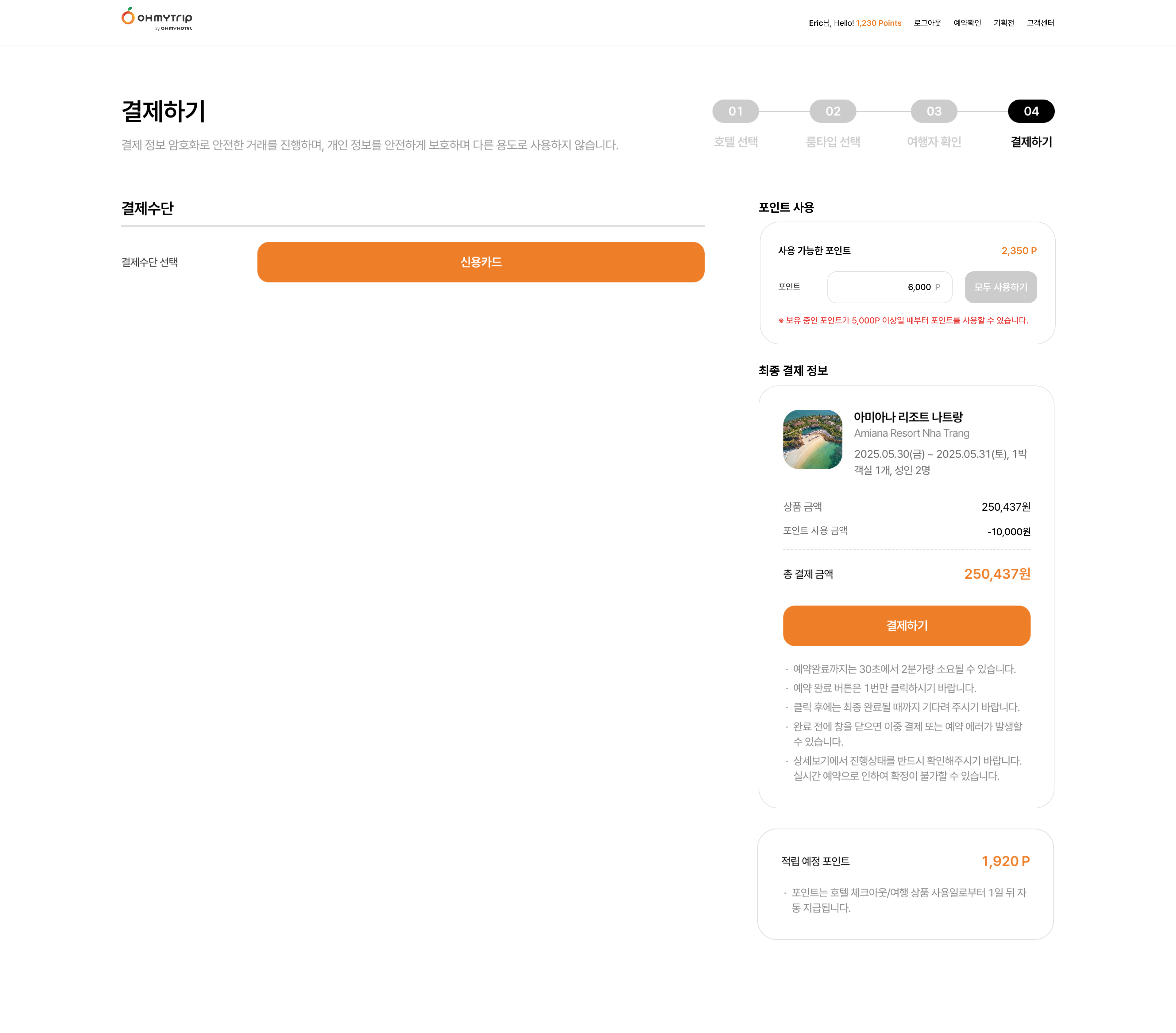
Files
Related issues
Updated by Lexi Kim 11 months ago
- Copied to 기능(Feature) #55: [OMT/Mob] 1.5. 결제하기 Thanh toán added
Updated by ziniy Kang 11 months ago
- Due date changed from 06/30/2025 to 05/16/2025
Updated by Joseph Vo 10 months ago
- Copied to 기능(Feature) #175: [OMT/PC BE] 1.5. 결제하기 Thanh toán added
Updated by Joo dev 10 months ago
- Status changed from 신규(New) to 진행(Doing)
Case phát sinh:
- Số tiền tối thiếu để sử dụng: 5000P
Case 1: Tổng tiền cần thanh toán < 5000 => Confirm: có cho sử dụng số point hay không?
Case 2: Tổng tiền cần thanh toán là 6000, số point hiện tại là 7000 => nếu user nhấn nút Use all => số tiền sẽ tự động nhập vào là 6000 có đúng không? nếu user vẫn nhập 7000 thì message error sẽ là gì?
Updated by Lexi Kim 10 months ago
Dear Joo dev, Here is the answer to your question.
Case 1. If the total payment amount is less than 5,000:
Points can still be used. Regardless of the total payment amount, if you have 5,000 points or more, you are allowed to use them.
Case 2. If the user has more points than the total payment amount:
Case 2-1. When the "Use All" button is clicked, the amount of points equal to the payment amount is automatically entered.
Case 2-2. If the user manually enters more points than the payment amount, it is automatically adjusted to match the payment amount.
And I updated the Policy in Notion.
https://www.notion.so/B2C-Point-System-1bc0df1854a1804aa623d331197a0c2d?pvs=4#1f40df1854a180a29e5bf5b97fc5e6e4
Updated by ziniy Kang 10 months ago
- Status changed from 피드백(Feedback) to 진행(Doing)
Updated by ziniy Kang 10 months ago
- Assignee changed from Joo dev to ziniy Kang
Updated by ziniy Kang 10 months ago
- Status changed from 진행(Doing) to 피드백(Feedback)

