Actions
결함(Bug) #2855
closed[Plan] Remove Gender Field from Guest Information on My Page
Start date:
01/07/2026
Due date:
01/08/2026
% Done:
100%
Estimated time:
Part:
PLAN
Build env.:
Description
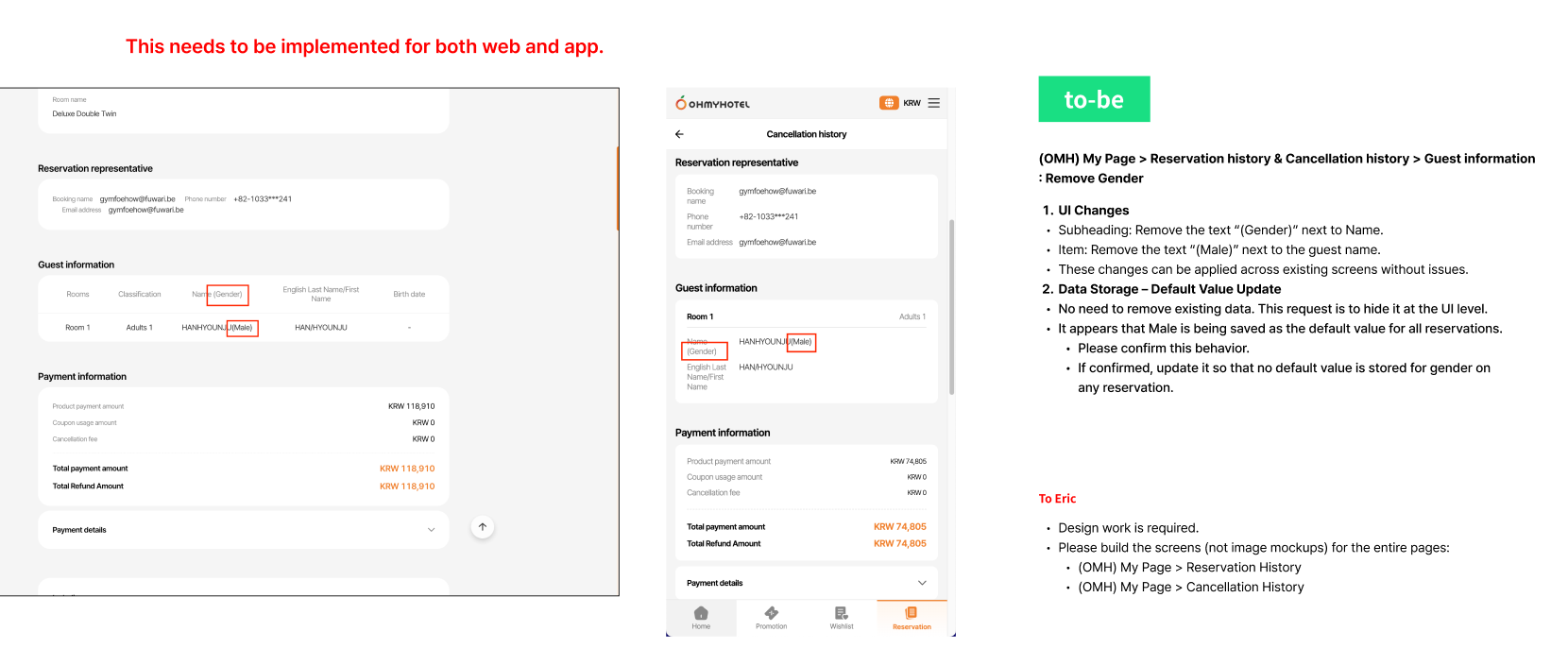
1. UI Changes
- Subheading: Remove the text “(Gender)” next to Name.
- Item: Remove the text “(Male)” next to the guest name.
- These changes can be applied across existing screens without issues.
2. Data Storage – Default Value Update
- No need to remove existing data. This request is to hide it at the UI level.
- It appears that Male is being saved as the default value for all reservations. Please confirm this behavior.
- If confirmed, update it so that no default value is stored for gender on any reservation.
Figma Storyboard : https://www.figma.com/design/cpkikT3UpCW8aYIvBdT4tL/-SB--Mypage-Gender?node-id=1-46&t=nWWgwJoqYjyvKY35-0
Files
Related issues
Updated by Zia Han 2 months ago
- Copied to 결함(Bug) #2856: [Design] Remove Gender Field from Guest Information on My Page added
Updated by ziniy Kang 2 months ago
- File picture385-1.png picture385-1.png added
- Description updated (diff)
Updated by ziniy Kang 2 months ago
- Due date set to 01/08/2026
- Status changed from 완료(Done) to 완료성공(Resolve)
- Start date set to 01/07/2026
- % Done changed from 0 to 100
Updated by ziniy Kang about 2 months ago
- Related to 결함(Bug) #2917: [FE] Remove Gender Field from Guest Information on My Page added
Actions

