기능(Feature) #1117
closed기능(Feature) #1040: * OMH COUPON
개선(improvement) #2032: + OMH COUPON (Ho Chi Minh)
기능(Feature) #1087: ADMIN
Add 'Coupon' Filter and Hana Coupon Columns
100%
Description
Plan: https://www.figma.com/design/ltBgXdp9qtsZTzIODIZT1Y/%ED%98%B8%EC%B9%98%EB%AF%BC-%EB%B0%95%EB%9E%8C%ED%9A%8C-%EC%98%A4%EB%A7%88%EC%9D%B4%EC%BF%A0%ED%8F%B0-B2C-UI-?node-id=1-158&t=3WTKNYWENzUw5X2e-1
Hiển thị giao diện dữ liệu theo Filter của Coupon Type
1. All
2. Hana coupon
3. Expo(Ho) Off
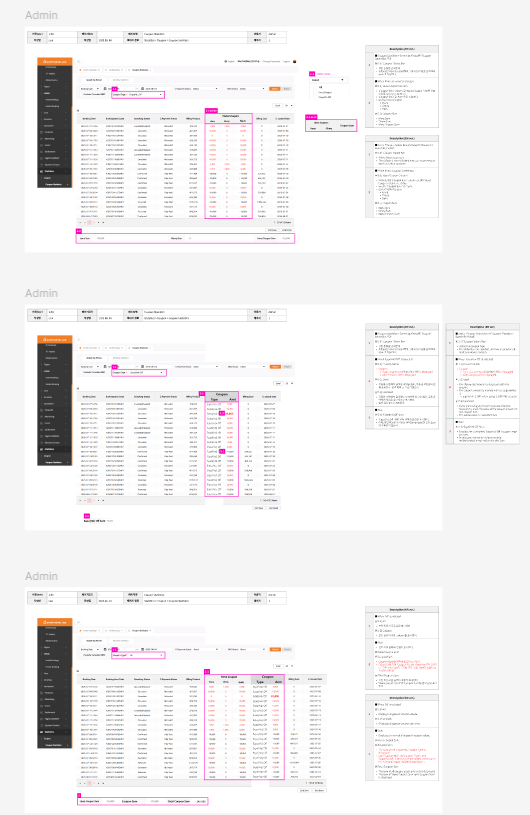
Files
| picture181-1.png (126 KB) picture181-1.png | |||
| image.png (79.5 KB) image.png | |||
| image.png (111 KB) image.png | |||
| picture275-1.png (141 KB) picture275-1.png | |||
| picture621-1.png (97.5 KB) picture621-1.png | Partnership | ||
| picture621-2.png (111 KB) picture621-2.png | Offline | ||
| picture621-3.png (157 KB) picture621-3.png | All |
Updated by harry harry 6 months ago
Tracy Tran chuyển lại trạng thái task cho dev làm tiếp
Updated by Tracy Tran 6 months ago
- Assignee changed from Tracy Tran to Tracy Truong
Updated by Tracy Truong 6 months ago
- File image.png image.png added
- Status changed from 피드백(Feedback) to 진행(Doing)
- Assignee changed from Tracy Truong to harry harry
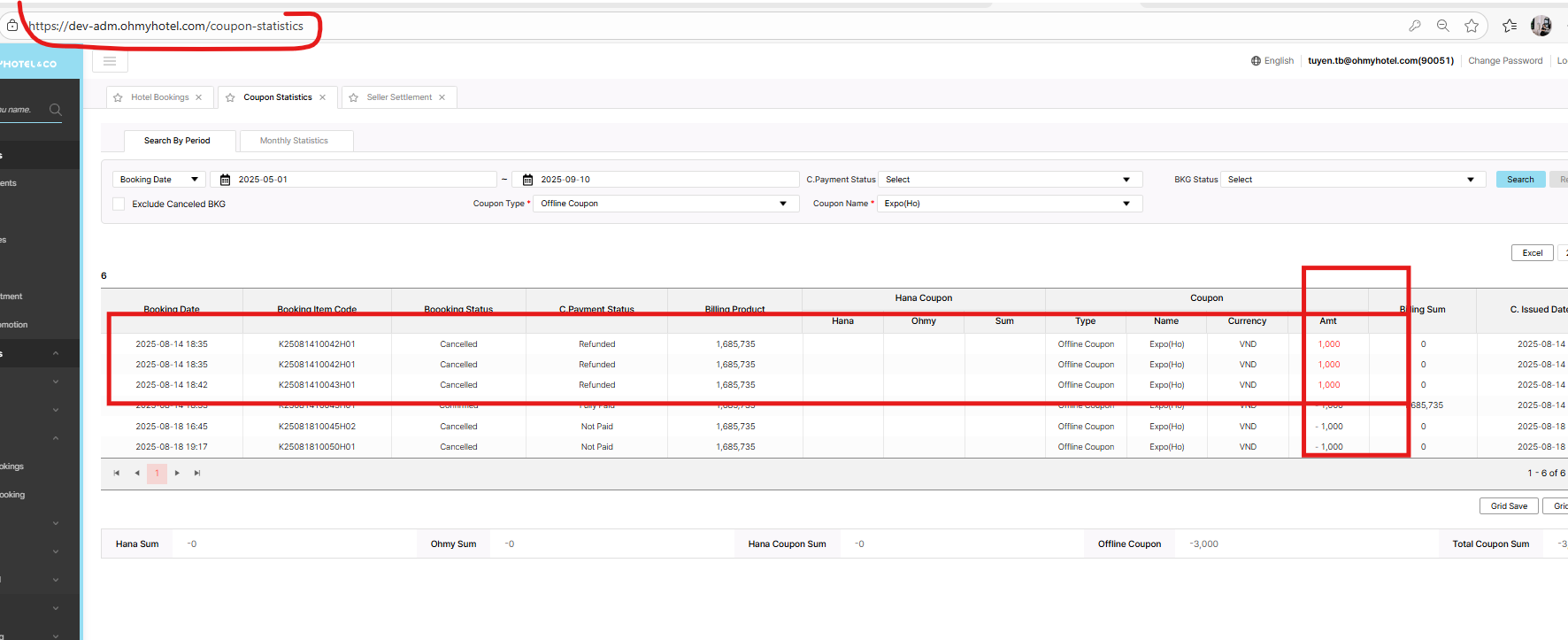
Hana Coupon columm added
coupon name: Expo (HO) => bên dưới hiển thị tên khác (Ohmyhotel Viet...)
Bk cancelled nhưng số tiền k chuyển sang màu đỏ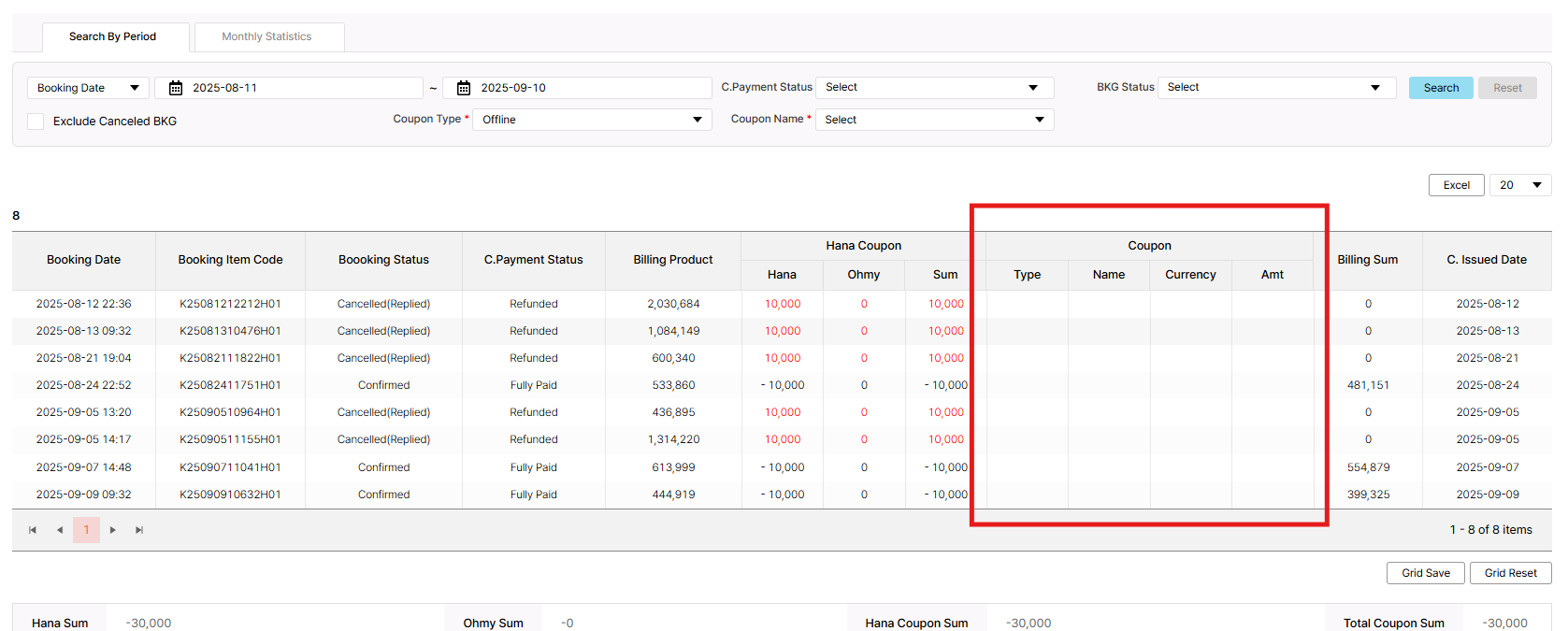
Updated by harry harry 6 months ago
- Assignee changed from harry harry to John Lee
Updated by Tracy Truong 6 months ago
Updated by Lexi Kim 6 months ago
Dear Lexi Kim Kim,
cc: John Lee Lee
I have a question for this case
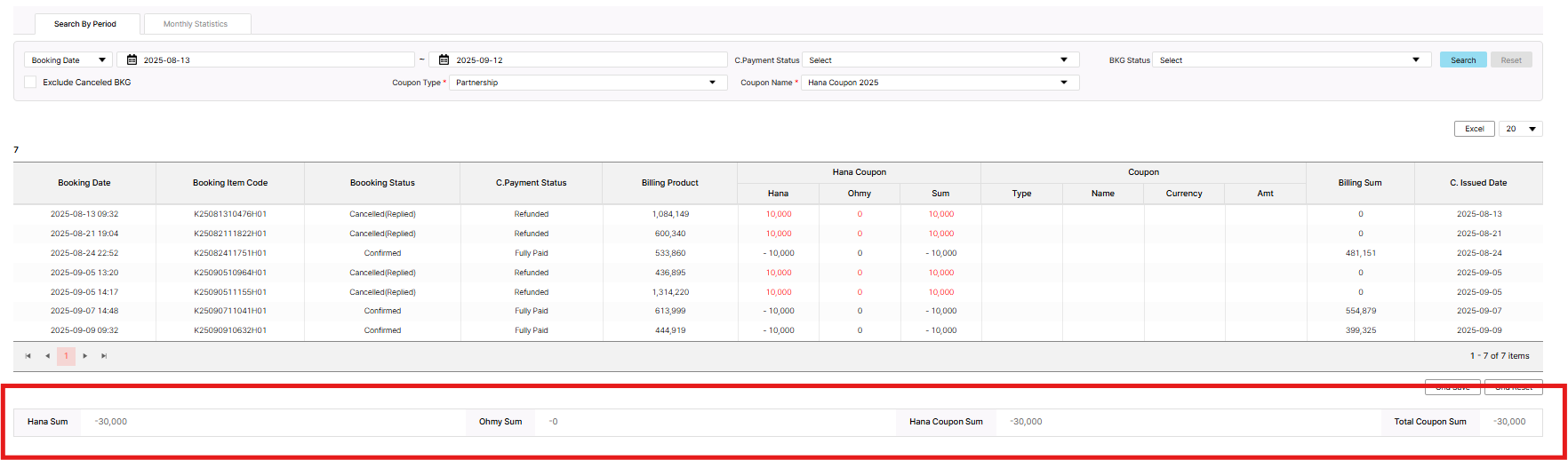
When I select Coupon type is Partnership & Coupon Name is Hana Coupon. The coupon column will be hide (as picture in Figma) or still display but data empty as capture below
'still display but data empty as capture below' is right. You can select 'All' and look up all types of coupons. Whatever type you choose, the "Hana Coupon" and "Coupon" columns are always maintained.
Updated by Tracy Truong 6 months ago
- Status changed from QA test to 완료(Done)
- Assignee changed from Tracy Truong to John Lee
Checked on Dev, BK status cancelled - payment Status: Refundable => Coupon amount text change to red color => ok
Other case cannot test on Dev, will retest on STAG
Confirmed with IT Team - Harry
Updated by Tracy Truong 6 months ago
- File picture621-1.png picture621-1.png added
- File picture621-2.png picture621-2.png added
- File picture621-3.png picture621-3.png added
Dear Lexi Kim Kim,
cc: John Lee Lee
About the Coupon Sum Part,
1. Partnership coupon:
On Admin: there are 4 columns: Hana Sum, Ohmy Sum, Hana Coupon Sum, Total Coupon Sum
On requirement, just 3 columns displayed & don't have Total Coupon Sum
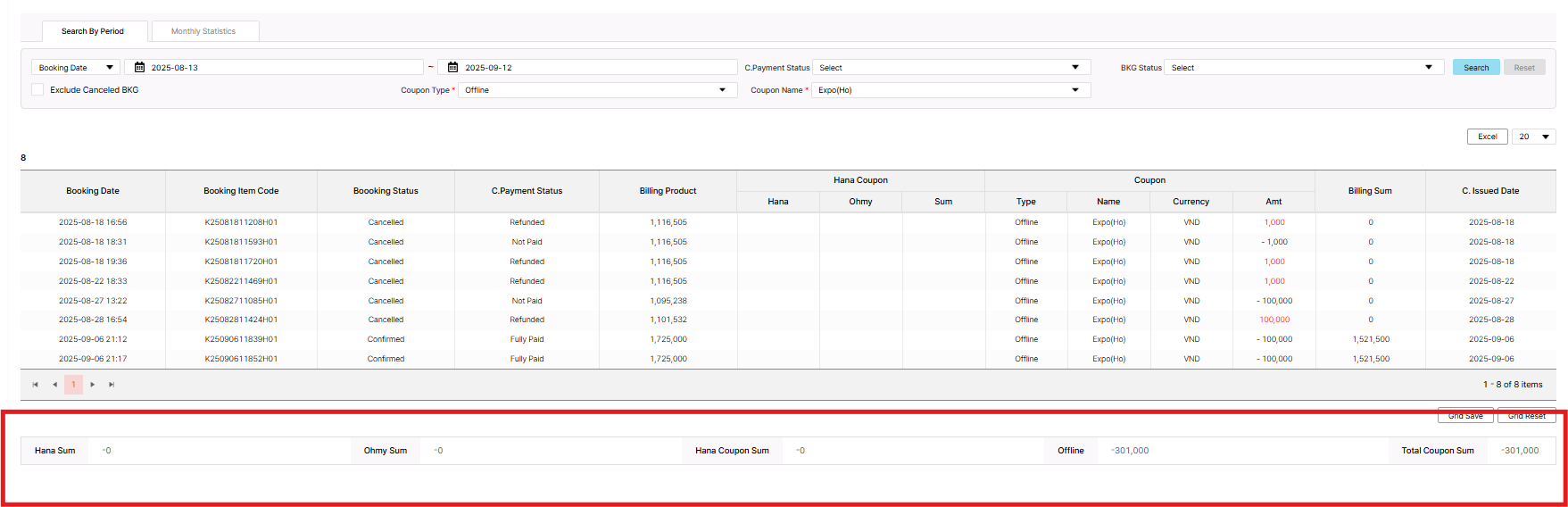
2. Offline Coupon
On Admin: there are 5 columns: Hana Sum, Ohmy Sum, Hana Coupon Sum, Offline, Total Coupon Sum
On requirement, just Sum column displayed only
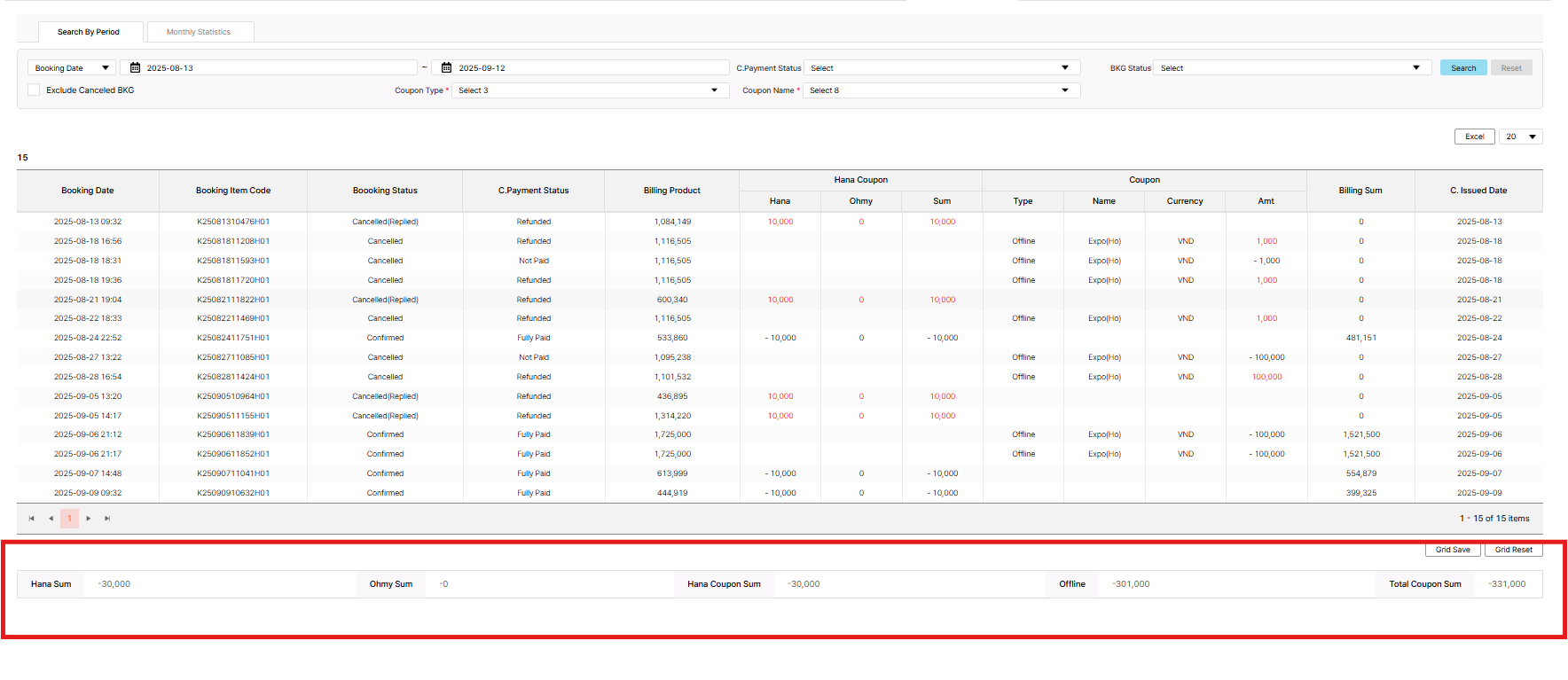
3. All
On Admin: there are 5 columns: Hana Sum, Ohmy Sum, Hana Coupon Sum, Offline, Total Coupon Sum
On requirement, just 3 columns displayed Hana Coupon Sum, Offline Sum, Total Coupon Sum only
Please advise us we need to make it the same with requirement or keep as current. Thank you!
Updated by Tracy Tran 6 months ago
- Assignee changed from Tracy Tran to Tracy Truong
Updated by Lexi Kim 6 months ago
Regardless of which value you choose, the Coupon Sum appears as follows:
Hana Sum, Ohmy Sum, Hana Coupon Sum, Offline, Total Coupon Sum.
e.g) Even if you select 'offline' only, 5 values are displayed all.
FYI:
Hana Sum = amount paid by Hana
Ohmy Sum = amount paid by Ohmy (current, it's 0)
Hana Coupon Sum = Hana Sum + Ohmy Sum
Offline = Total of all coupon amounts for offline type
Total Coupon Sum = Hana Coupon Sum + Offline.
Updated by Tracy Truong 6 months ago
- Status changed from QA test to 피드백(Feedback)
- Assignee changed from Tracy Truong to John Lee
Please adjust it as Lexi's comment above
Updated by Tracy Truong 6 months ago
- Status changed from QA test to 완료성공(Resolve)
- Assignee changed from Tracy Truong to John Lee
Please check new task #1686